CAMPUS PRO
Bringing students, faculty, and campus resources together. One app. Every need.
A better student experience.
Branding
ERP App
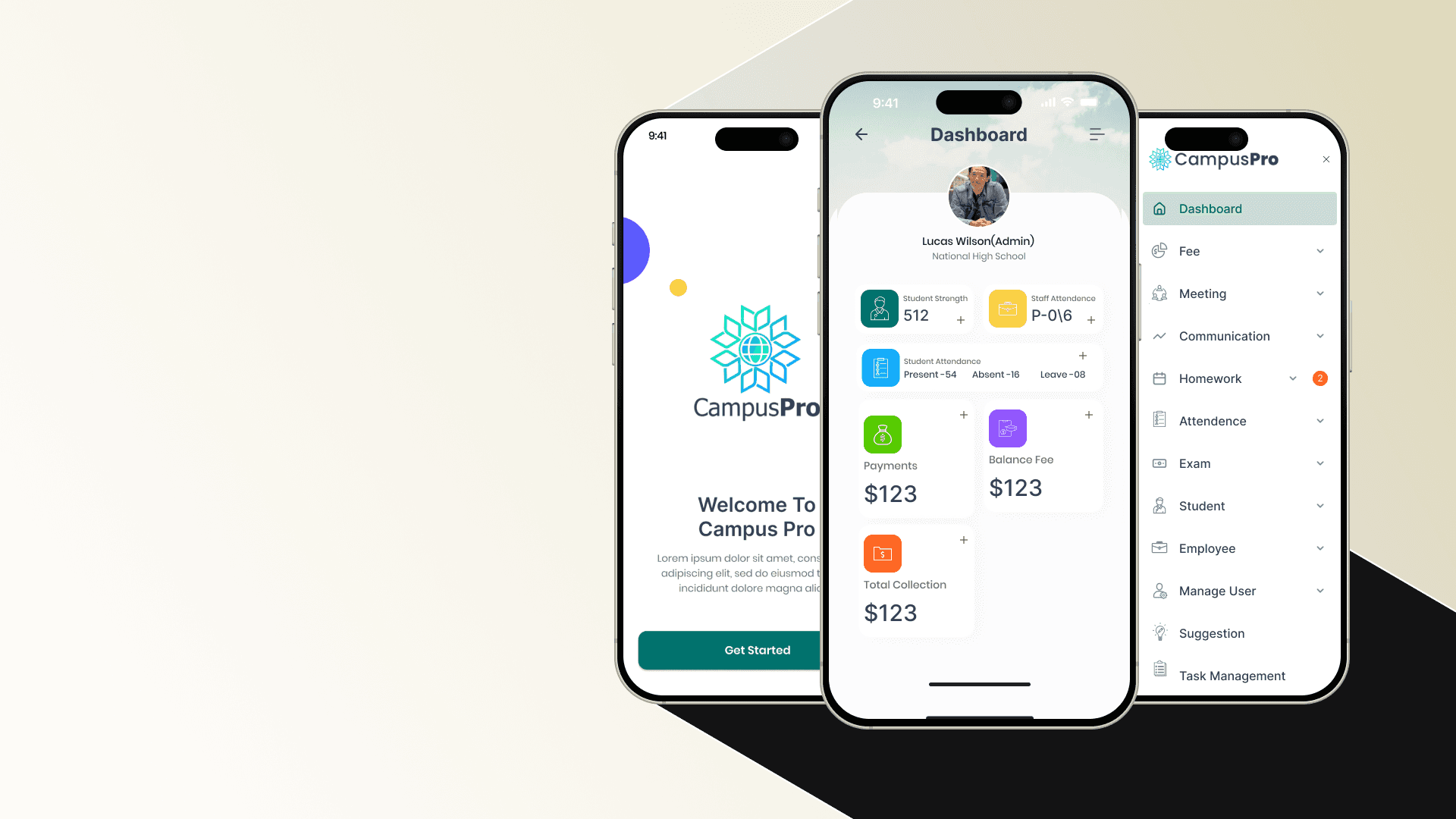
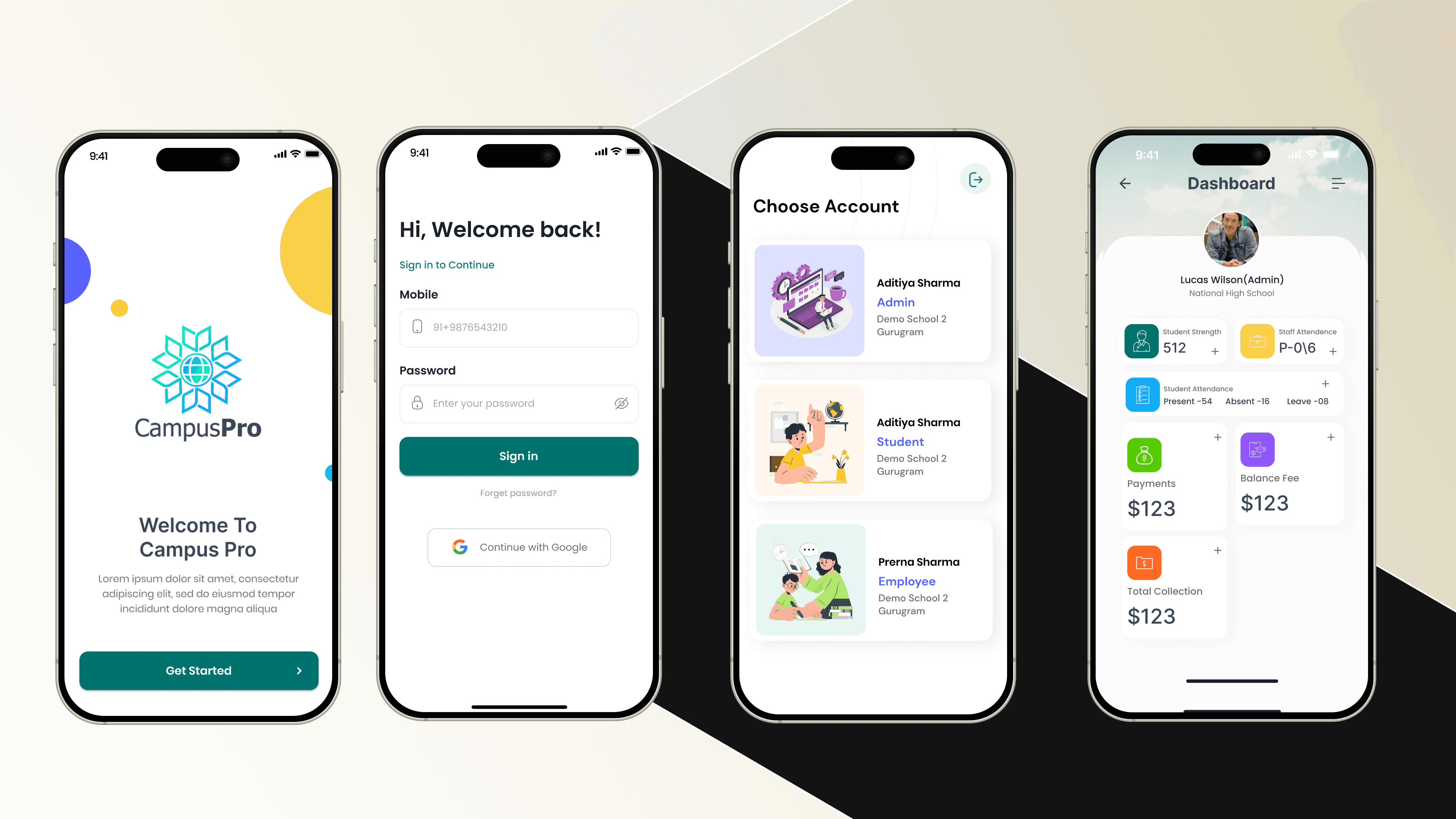
Dashboard
Introduction
Campus Pro is a smart digital platform designed to simplify student life and campus management. It brings together everything students, faculty, and administrators need-from attendance tracking and course management to event updates, communication, and resource sharing-all in one intuitive mobile-first app.
Let's get started - What If Managing Campus Life Was as Easy as Scrolling Your Feed?
For most students, daily campus tasks can feel… overwhelming. Juggling classes, remembering deadlines, keeping up with events, and staying connected with faculty often means relying on scattered tools, endless emails, and outdated portals. The result? Missed information, low engagement, and a fragmented student experience.
Campus Pro steps in to change that. It isn’t just another college app—it’s a unified, student-first platform that connects everyone on campus in one place. No delays, no confusion, no juggling multiple systems. Whether it’s checking attendance, receiving real-time event alerts, or accessing academic resources, students can now do it all quickly, clearly, and stress-free.
The real win? Campus Pro doesn’t just digitize campus tasks, it humanizes them. With an easy-to-use interface, simplified navigation, and features tailored for both students and faculty, the platform makes managing academic life feel less like a chore and more like a connected experience.
This case study walks you through how I helped design that journey—crafting a platform where technology, clarity, and empathy meet to make student life simpler, smarter, and more engaging.
Problem & Possible solution
The Problem We Wanted to Solve
Let’s be real—student life management isn’t always easy.
Most students juggle multiple apps, outdated portals, endless emails, and word-of-mouth just to stay updated on what’s happening on campus. From tracking attendance to managing class schedules, from finding events to staying in touch with faculty—everything feels scattered and inefficient.
And when systems are slow, confusing, or hard to use, it doesn’t just frustrate students—it creates gaps in communication, missed opportunities, and a less engaging campus experience.
Here’s what we noticed:
Information is scattered. Important updates and resources are spread across emails, notice boards, and multiple systems.
Engagement is low. Students often miss events or deadlines simply because they weren’t notified in time.
Usability is poor. Existing portals feel clunky and outdated, making daily tasks more frustrating than helpful.
Faculty face challenges too. Tracking attendance, sharing resources, and managing student communication often require extra effort.
This gap between what students need and what campus systems offer? That’s exactly what we set out to fix—with a smarter, student-first solution.

So, What Did We Build?
We knew campuses didn’t just need another management tool—they needed something that felt clear, engaging, and accessible. So we designed Campus Pro to do exactly that.
Here’s how it solves the problem:
Campus Life at Your Fingertips
No more chasing scattered updates. With Campus Pro, students can check attendance, view schedules, and get real-time notifications—all in one place.
Smarter Faculty Tools
Faculty members aren’t left behind. From taking attendance to sharing course material and announcements, Campus Pro makes classroom management quick and efficient.
Built for Speed and Clarity
The platform focuses on quick access and a clean interface. Students don’t waste time digging through clunky portals—they get what they need instantly, whether it’s grades, events, or resources.
A Connected Campus Community
Campus Pro goes beyond task management—it builds connection. With event updates, campus news, and communication tools, students feel more engaged and included in campus life.
Designed for Growth
The more the platform is used, the more valuable it becomes. With features for both academic and extracurricular life, Campus Pro evolves into the go-to hub for everything campus related.


Setting the Design Goals
When I first sat down to design Campus Pro, I had one big question in mind:
"How do we make campus life feel less…scattered?"
The primary objective was to create a solution that addresses the needs of all stakeholders in the education ecosystem—students, teachers, school administrators, and parents. Each group engages with the system differently, yet they are all interconnected.
The design goals, therefore, needed to balance functionality, accessibility, and emotional impact across diverse user groups.
Clarity Over Clutter
Campus platforms usually drown students in endless tabs, menus, and notifications. I aimed to strip away the noise—keeping the interface clean, focused, and welcoming so students could instantly find what matters.
Speed Meets Accessibility
Campus life doesn’t slow down. Whether it’s a last-minute class update or a club announcement, the design had to deliver information fast, in an intuitive flow, without barriers—so action is just a tap away.Trust Through Design
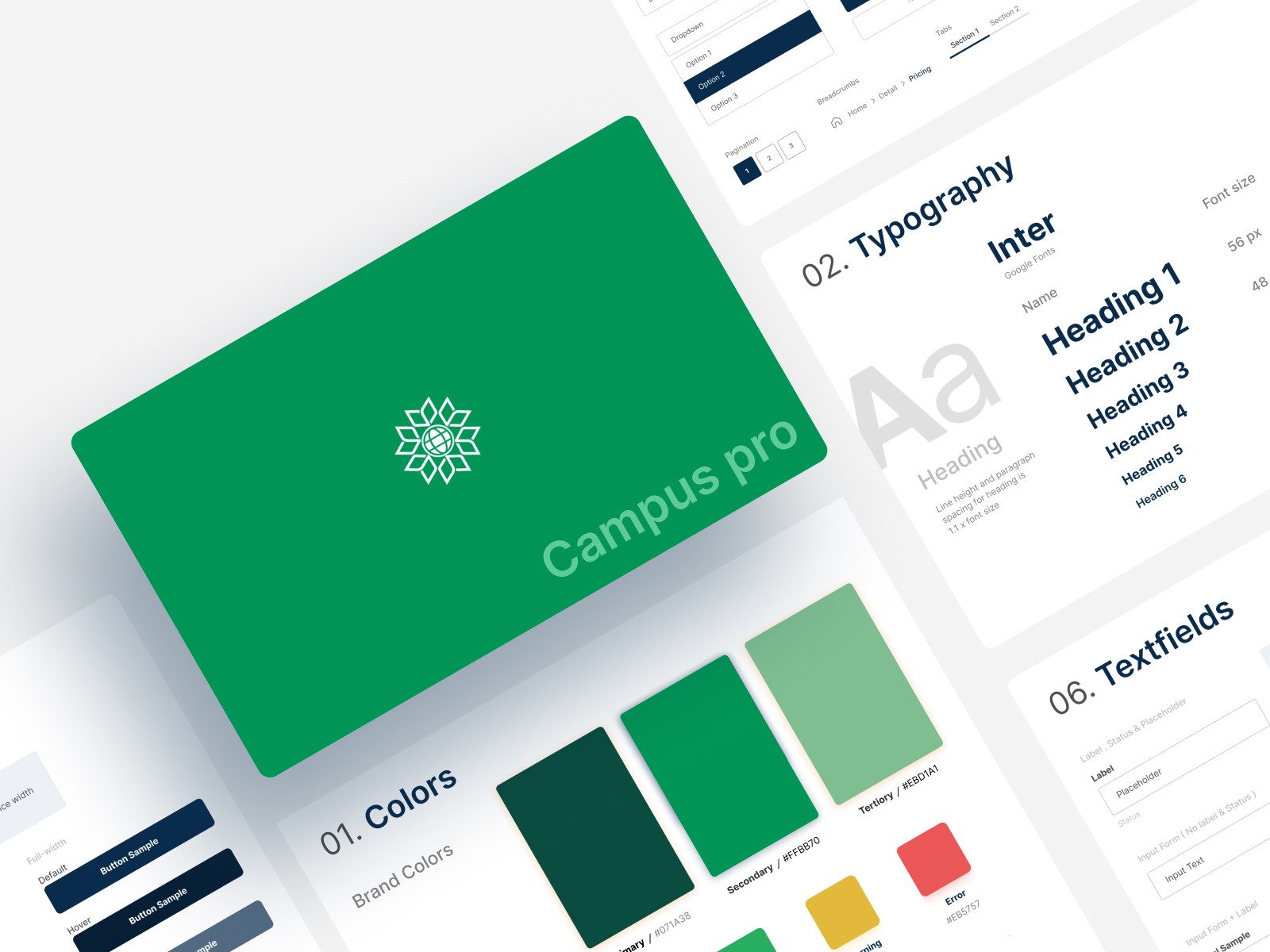
This platform isn’t entertainment—it’s where academics and community life come together. Building trust meant carefully chosen colors, structured layouts, and transparent microcopy that guide students and reassure administrators.Scalable & Resource-Rich
Campus Pro wasn’t just about quick alerts. The vision was a living hub—where events, updates, clubs, and resources could coexist and expand as the community grows.Balancing Tech with Human Connection
At its core, this platform is about people. The design needed to foster collaboration and community, ensuring interactions between students, faculty, and clubs feel authentic—not transactional.
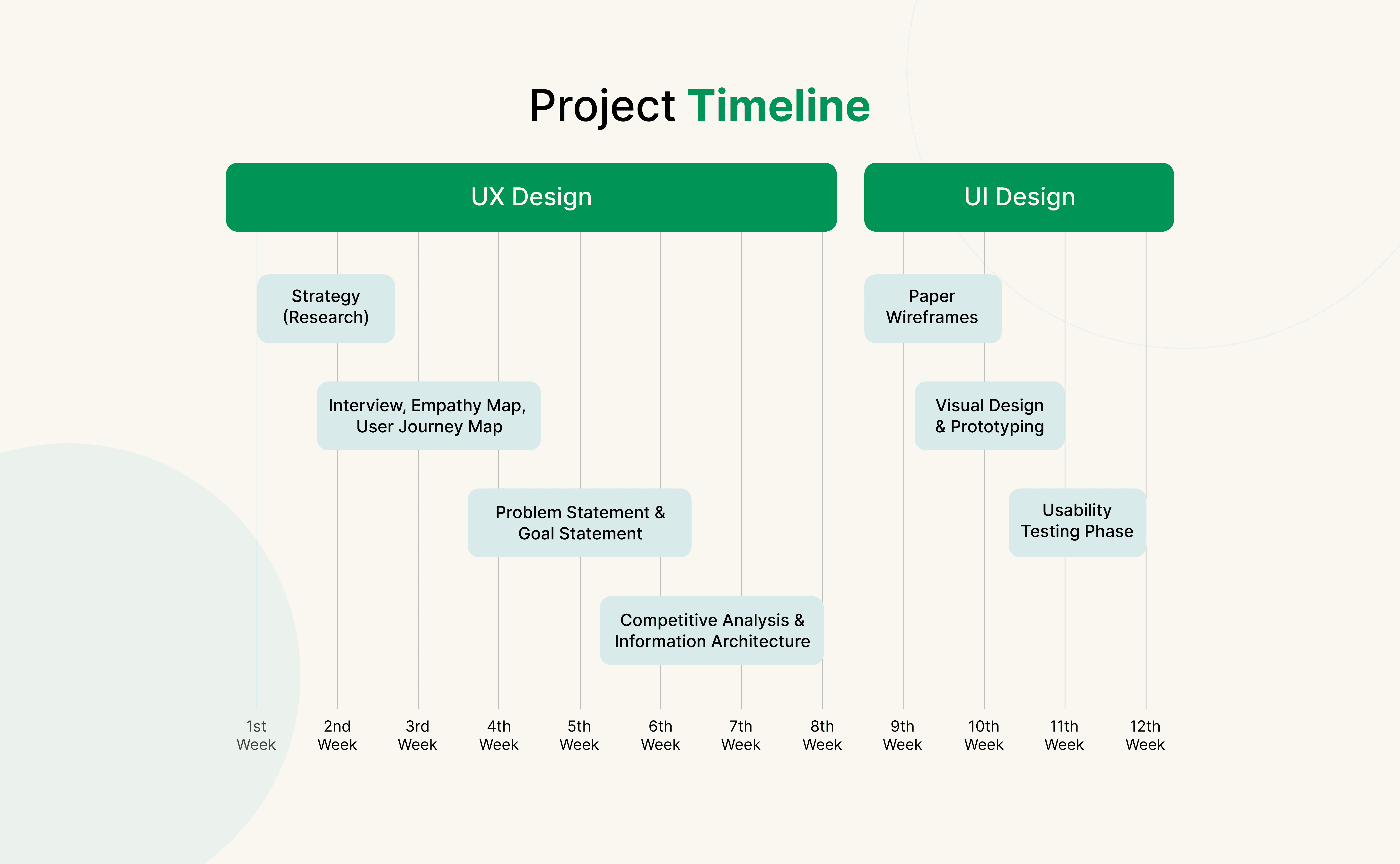
Getting to Know Our Users
Understanding Users
Uncovering needs, pain points, and motivations
Qualitative Research
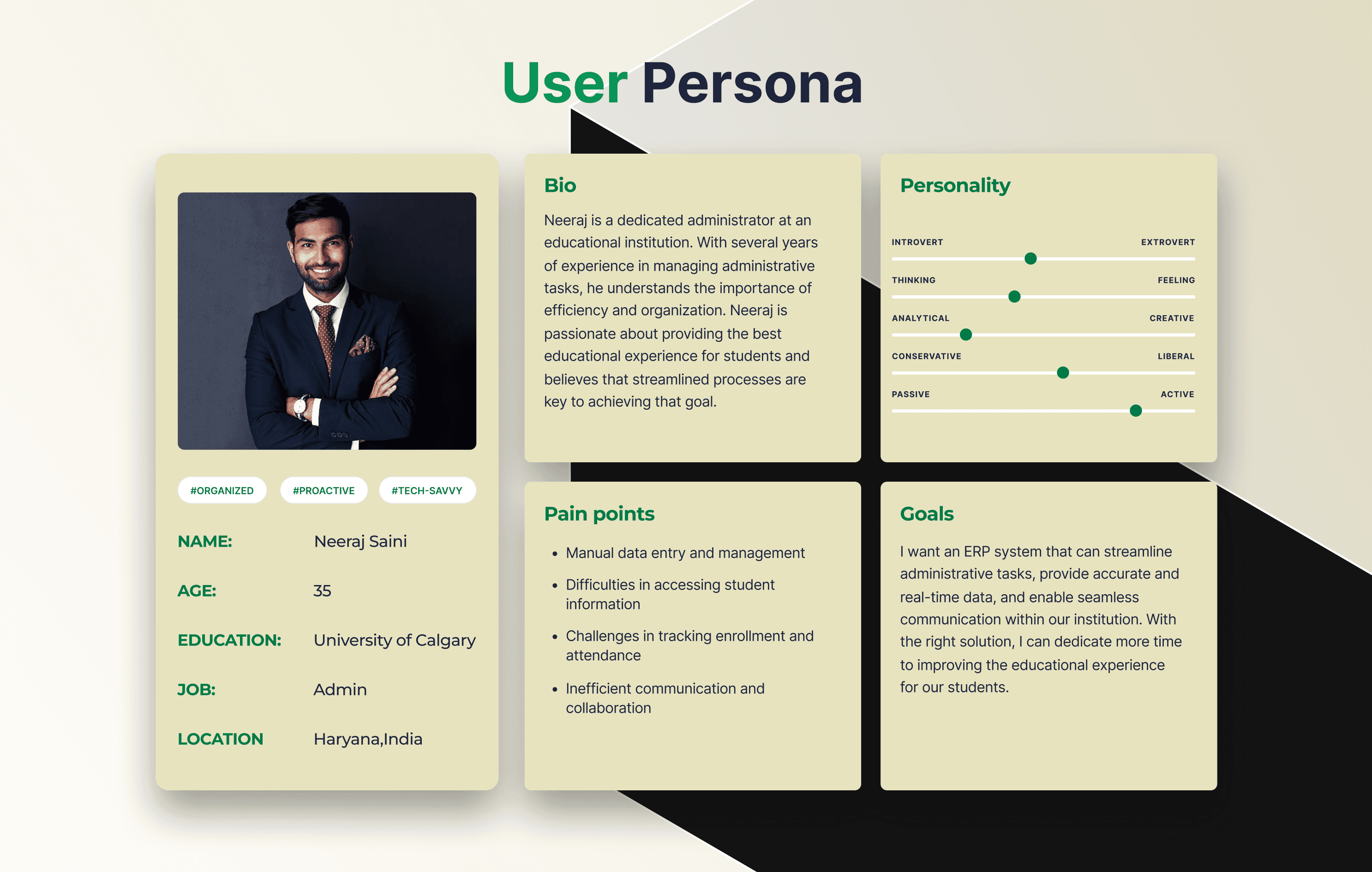
I spoke to a mix of users—students, teachers, club leaders, and administrators. These conversations were open-ended and revealed how fragmented communication feels on campus today.
Some of the key questions I asked included:
“How do you usually hear about important campus updates?”
“What’s the most frustrating part of staying informed?”
“How do you keep track of events, classes, and activities?”
“What would make communication feel easier, faster, or less stressful?”
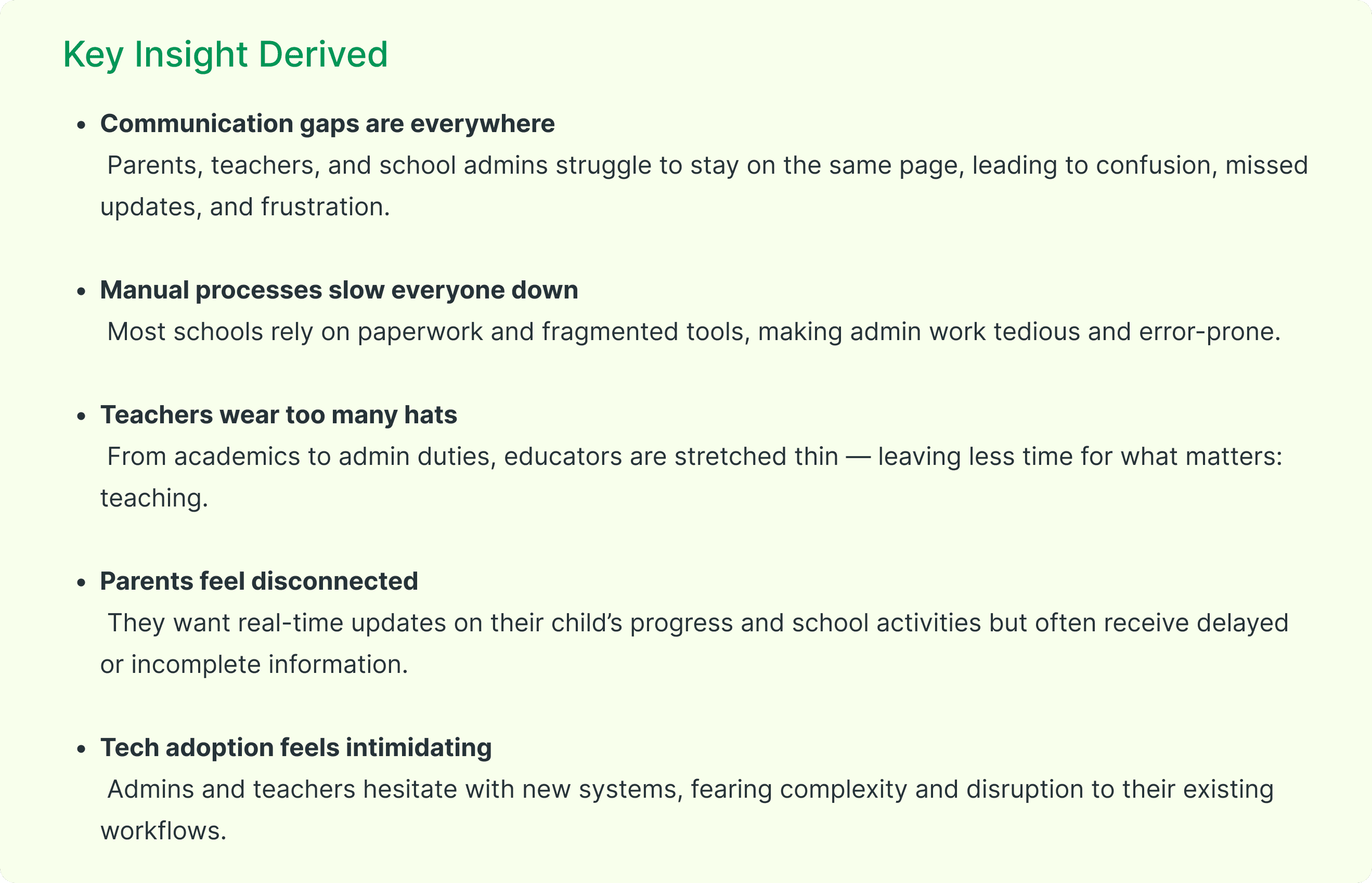
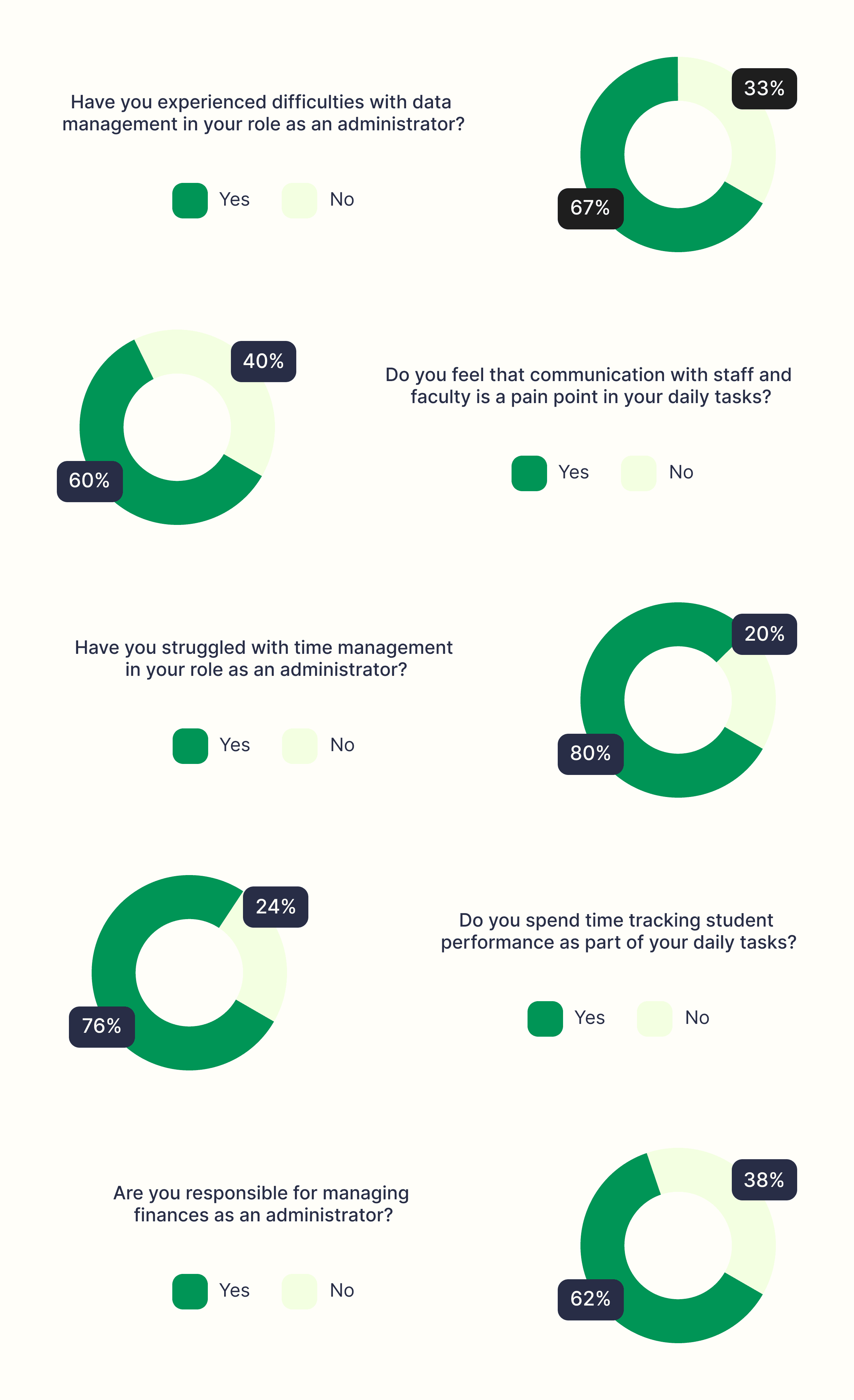
Quantitative Research
To complement this, I distributed surveys to a broader audience—including parents and staff. These helped validate recurring pain points and highlighted shared frustrations across roles.
What We Discovered (The Aha! Moments)
Here are some of the biggest insights that shaped Campus Pro’s foundation:
Information gets lost.
Students and parents often miss updates because they’re scattered across emails, WhatsApp groups, posters, and notice boards.Timing is everything.
A last-minute room change or event update often doesn’t reach the right people in time. Users want quick, reliable notifications.Trust is crucial.
Users rely on official, structured communication. If the source feels unclear or unverified, messages get ignored.Too many platforms.
Clubs use Instagram, teachers use email, admins use portals—creating confusion. Users want one central place to check.Community feels fragmented.
Instead of a connected campus culture, communication silos make it harder for students, staff, and parents to feel engaged together.Overload is real.
Users don’t just want more updates—they want smarter updates that cut through the noise and highlight what’s relevant to them.
Understanding the landscape before building Campus Pro
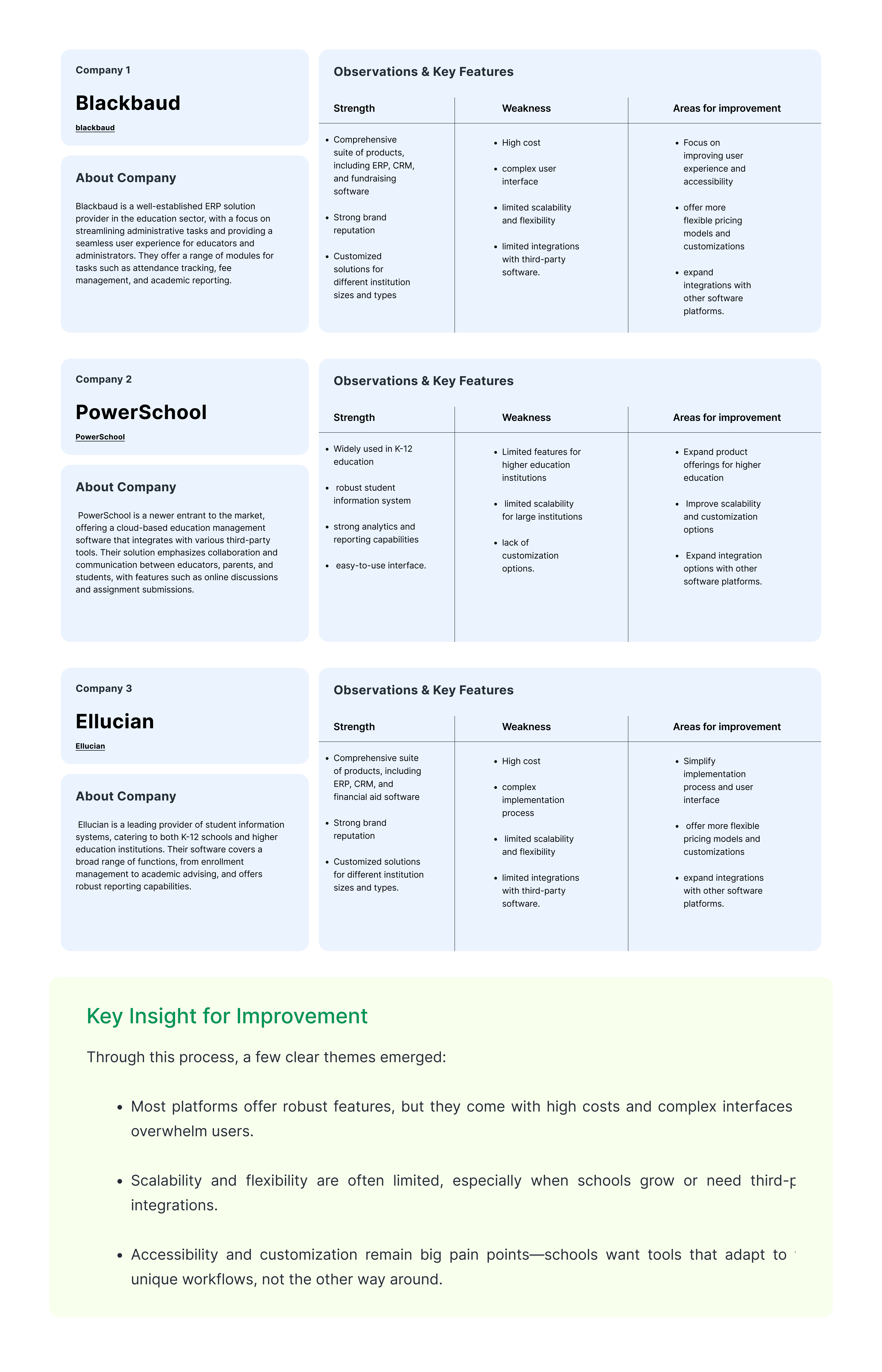
Before jumping into wireframes, we wanted to see how existing education management tools were serving schools, teachers, and students—and where they were falling short. We analyzed well-established ERP solutions like Blackbaud, PowerSchool, and Ellucian, studying their strengths, weaknesses, and areas for improvement.
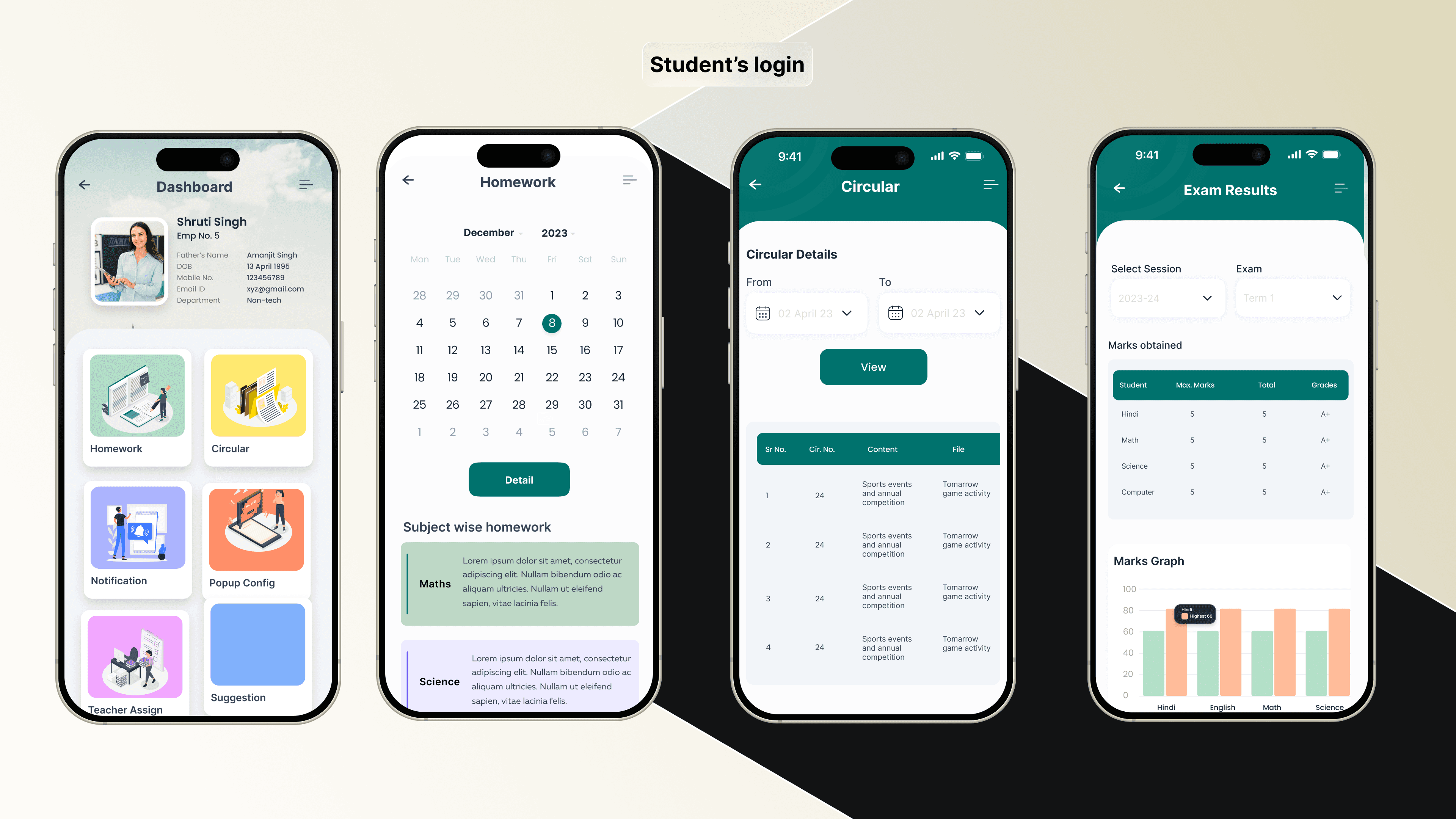
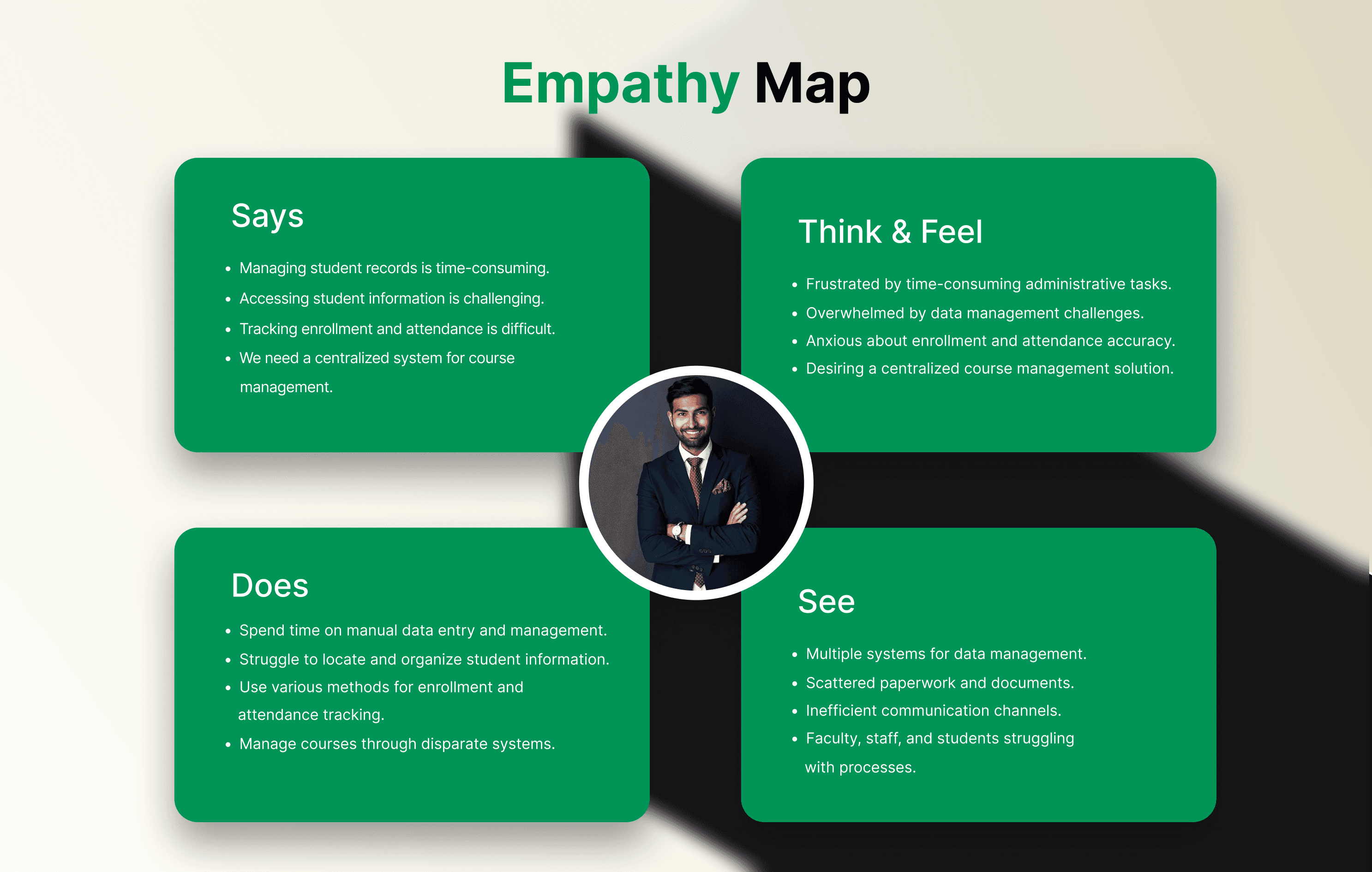
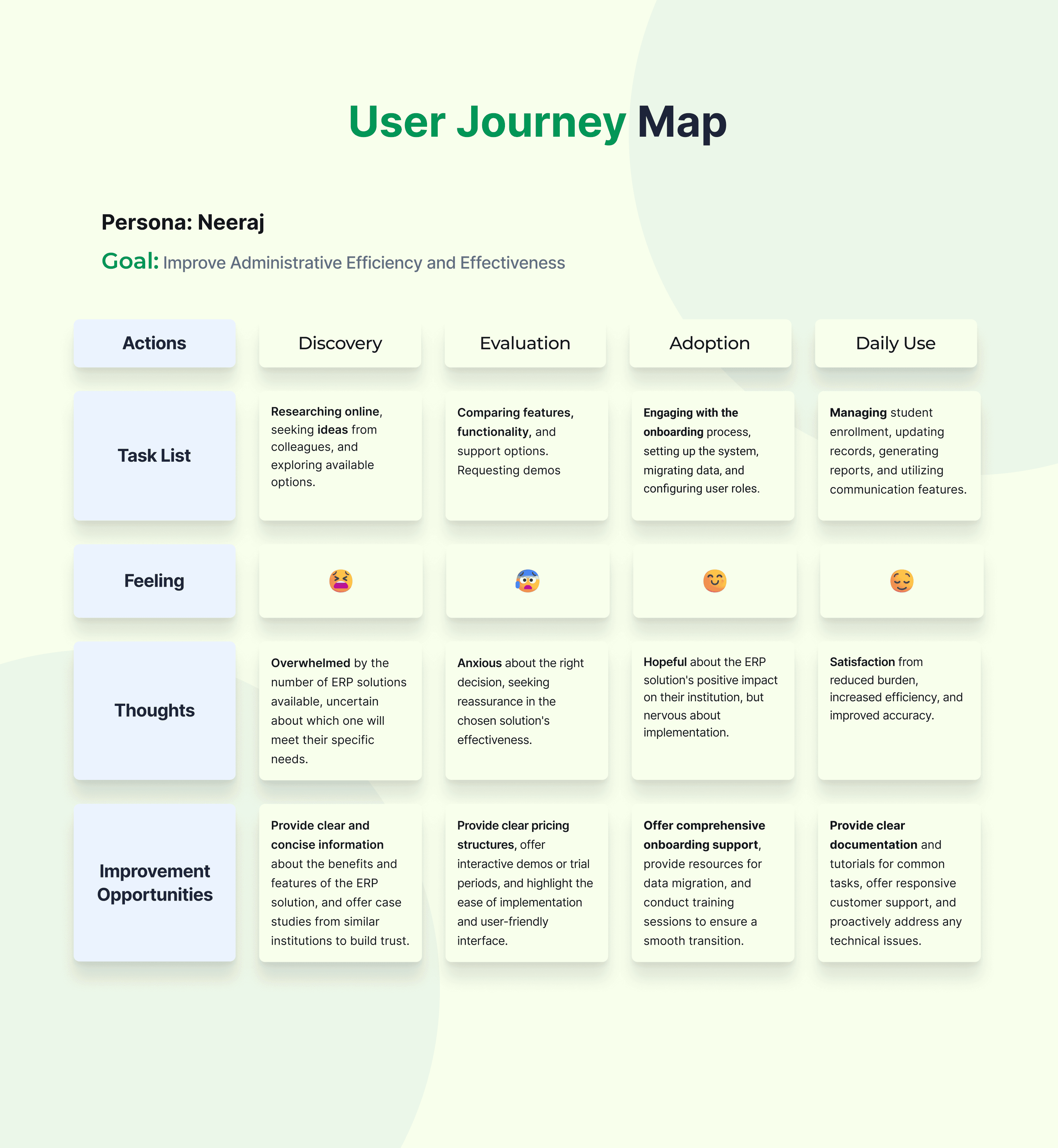
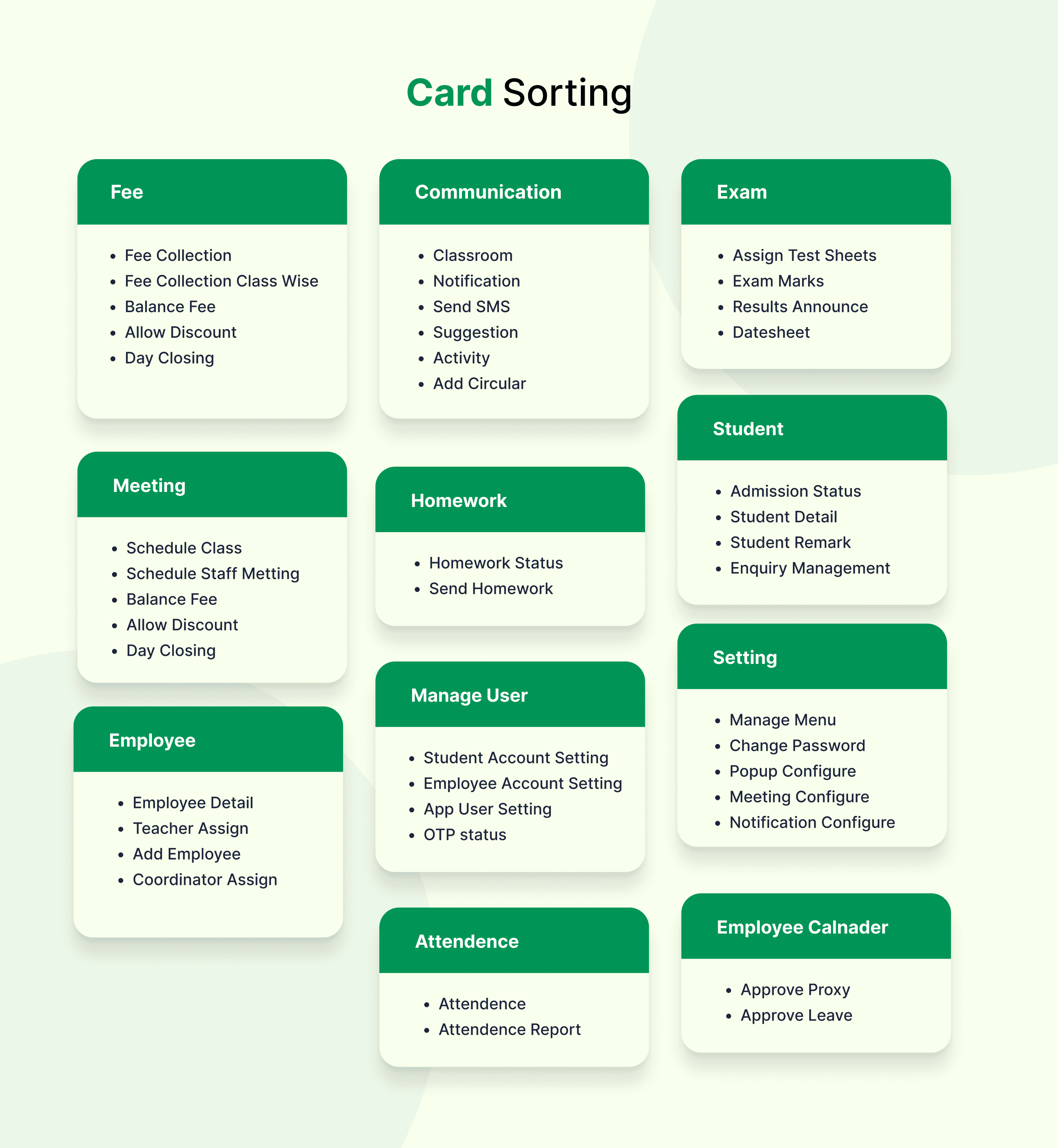
Now we connect the dots. We’ve gathered stories, numbers, and patterns — now it’s time to stitch them together into a problem worth solving.
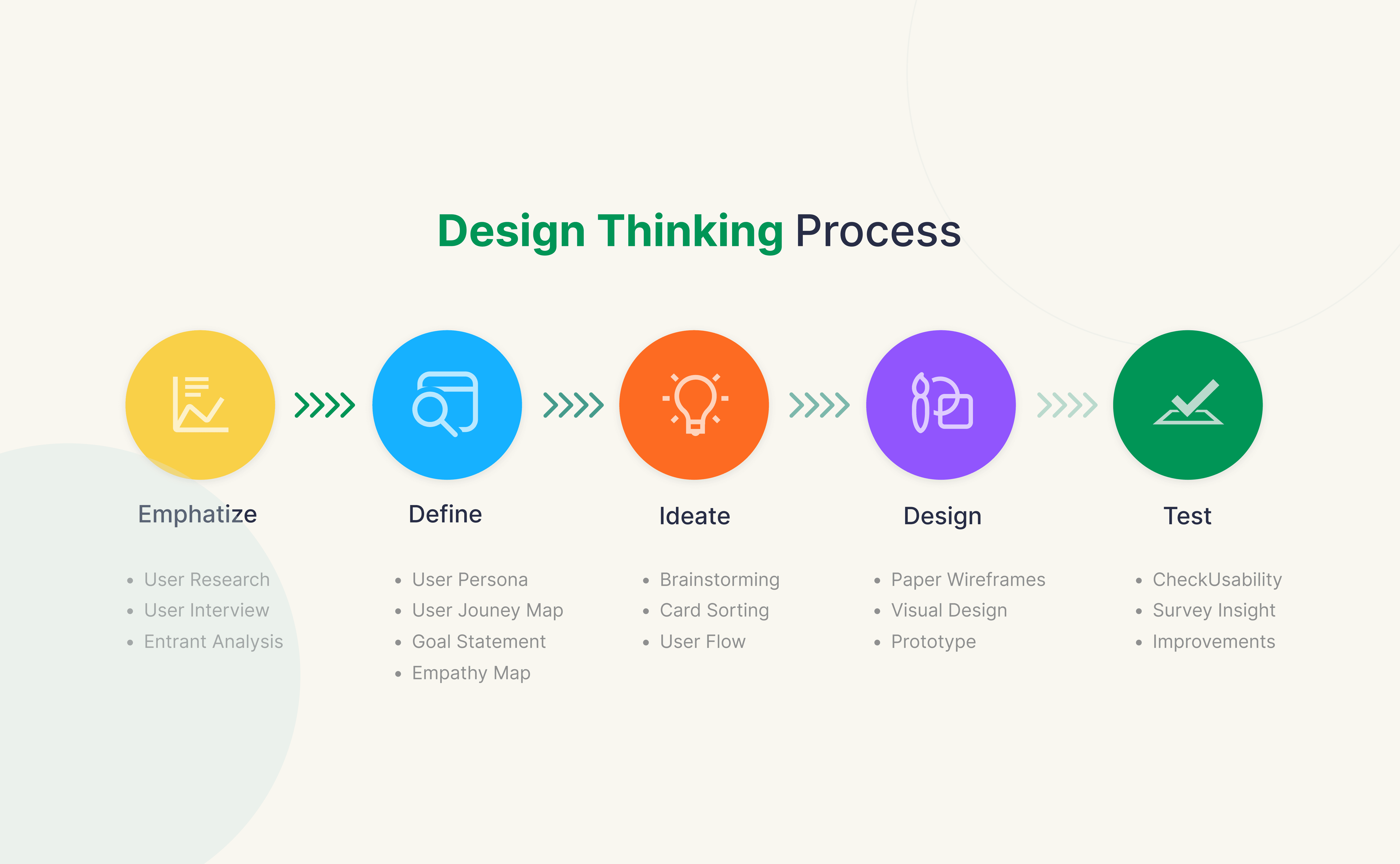
Research always brings in a lot of noise — interviews, observations, competitor insights, numbers, behaviors, motivations, frustrations. It’s easy to get lost in the pile. That’s why the Define phase is about slowing down and making sense of it all.
Here, we look for patterns. What do people keep repeating? What’s frustrating them the most? What goals are they actually trying to achieve? Instead of treating research as just data, we zoom out and ask: “What story is all this really telling us?”
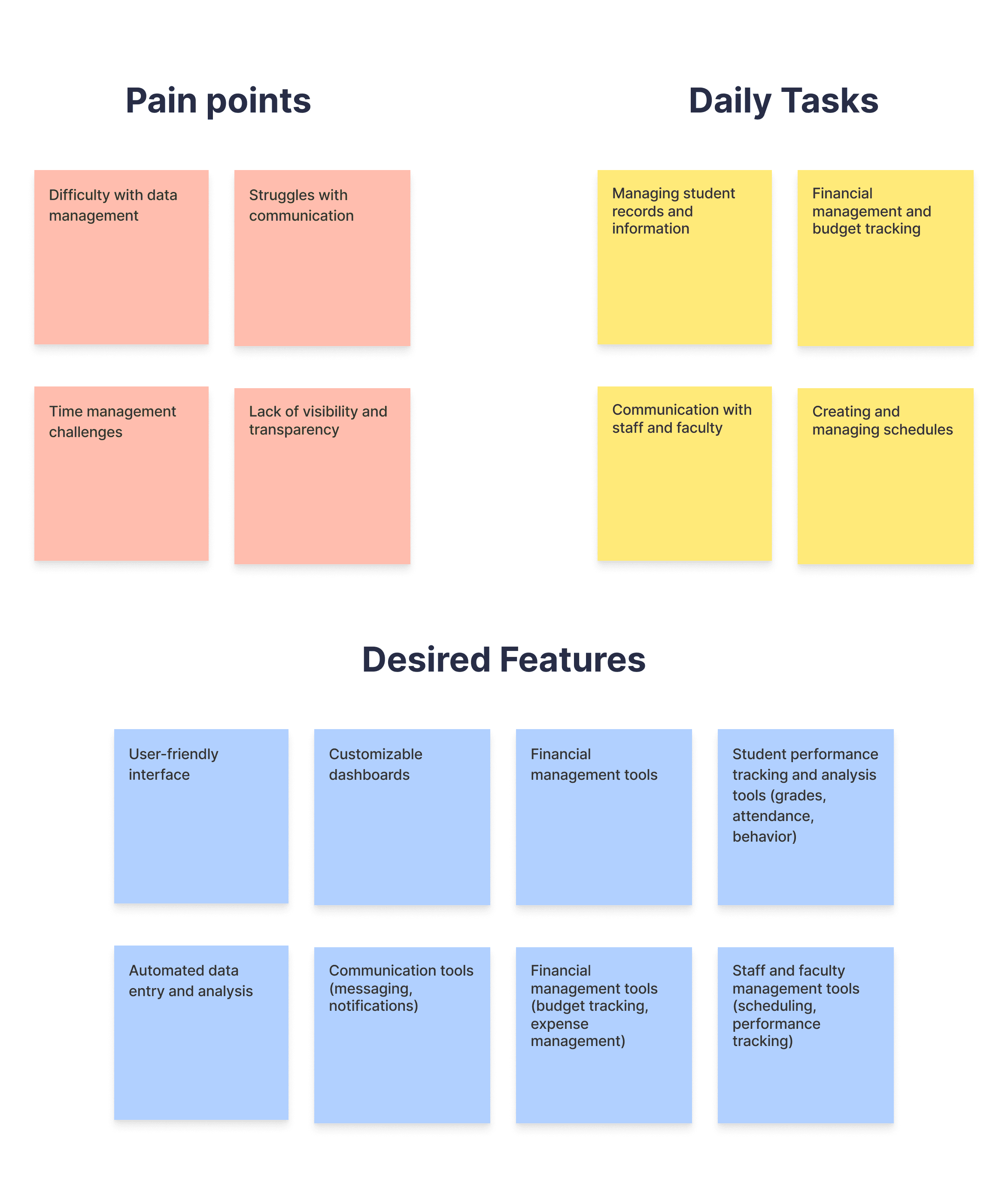
This is also the point where we stop chasing everything and decide on the right thing. By synthesizing the insights, we carve out a focused problem statement — a clear definition of what needs solving, why it matters, and who exactly we’re solving it for.
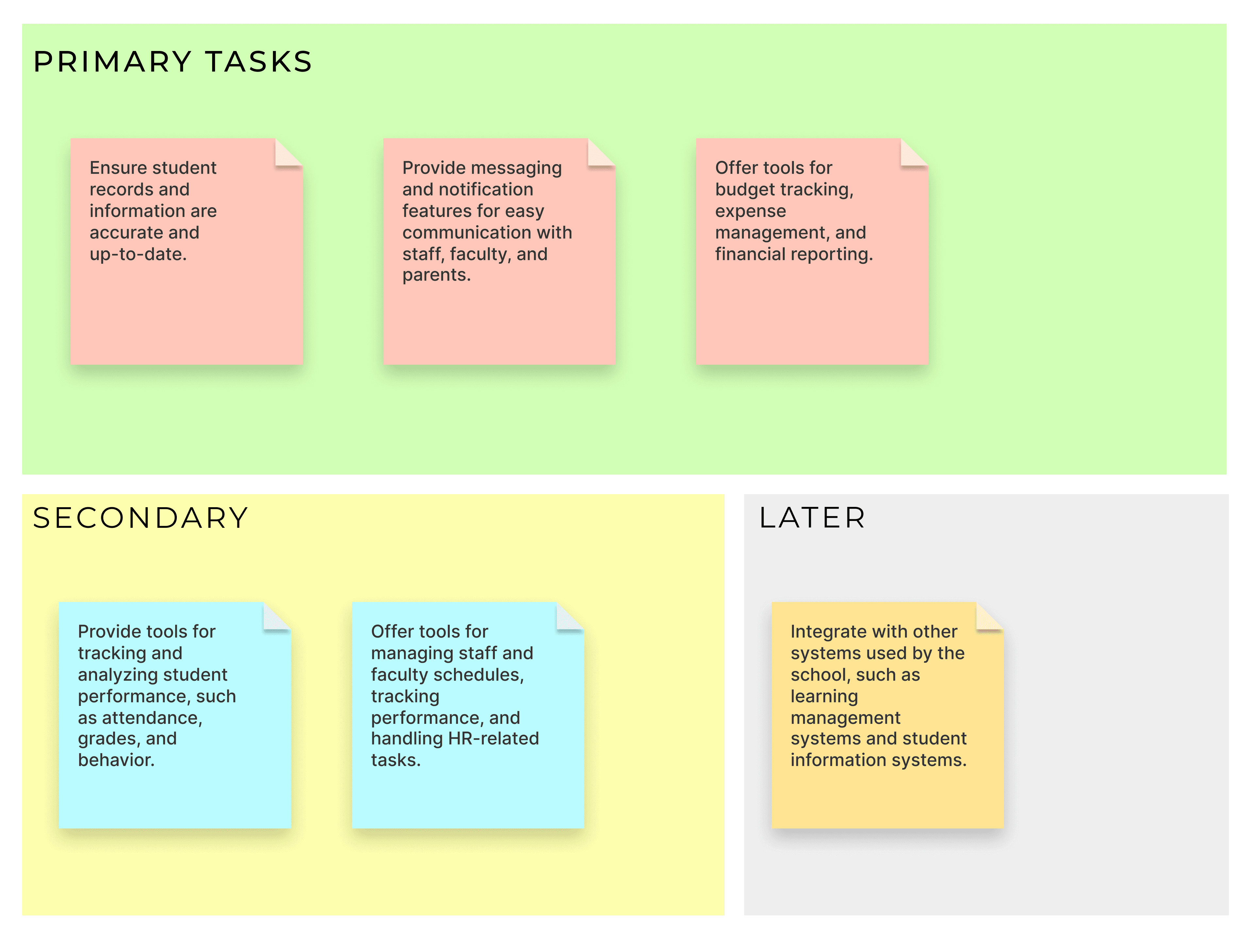
Think of it as going from a messy brainstorm wall covered in sticky notes, to one crisp sentence that becomes the North Star for design. That clarity doesn’t just keep us on track — it makes sure whatever we design actually matters to the people we’re building it for.
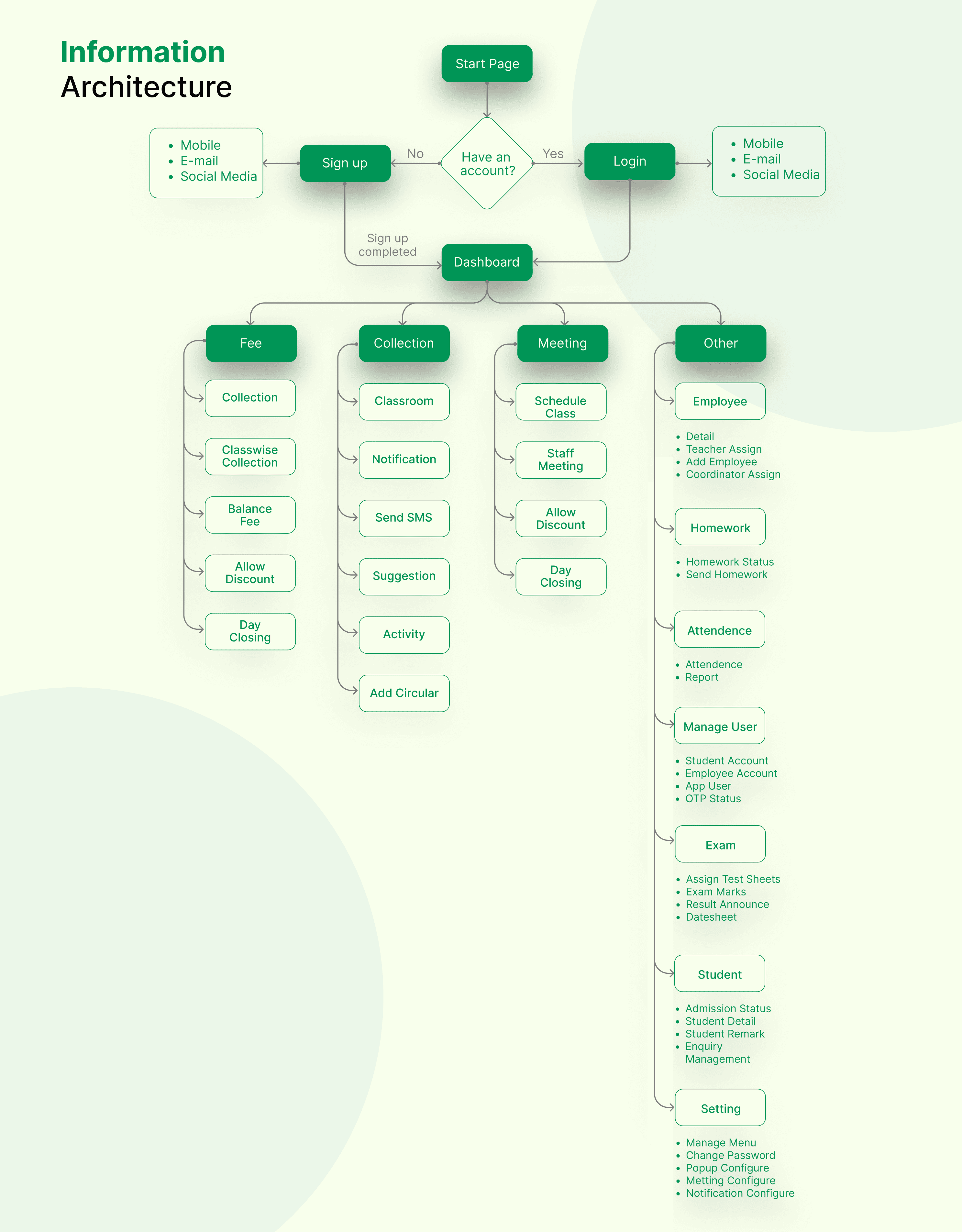
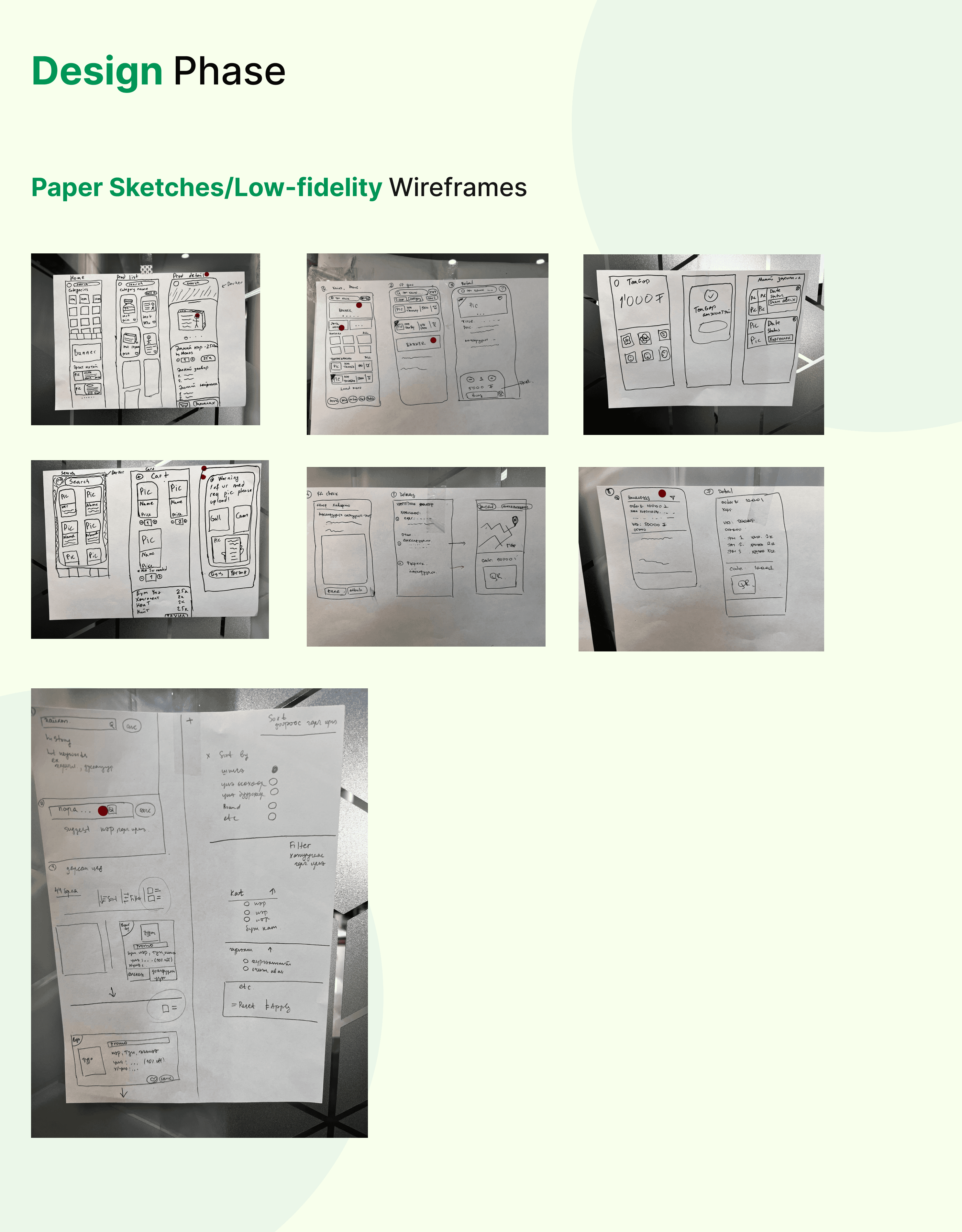
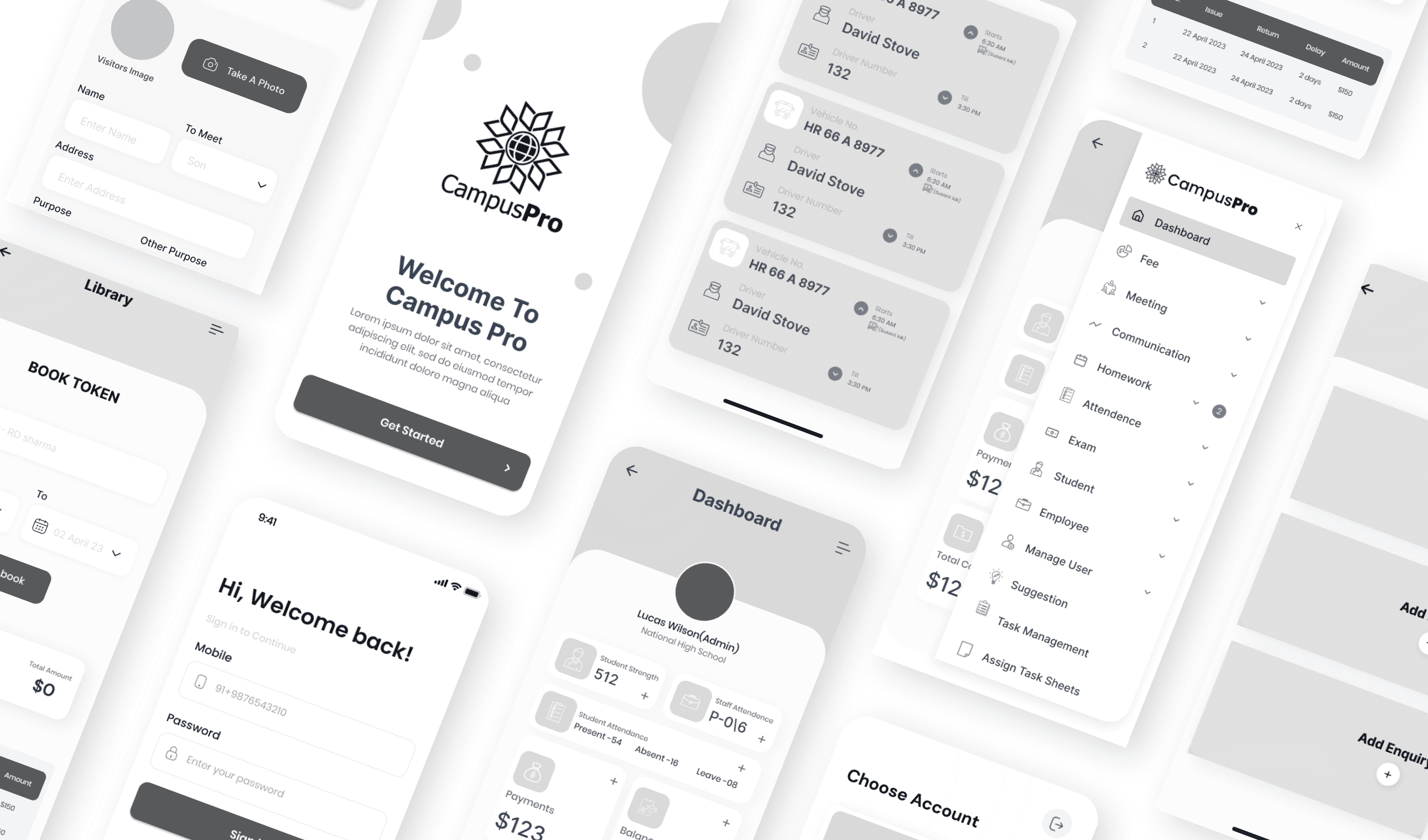

Results & Impact
So, What Did We Achieve?
The solutions we designed—shaped by research, testing, and iteration—had a clear impact on how students, teachers, and administrators engaged with the platform. From simplifying everyday tasks to fostering transparency and collaboration, the results spoke for themselves.
User Experience Improvements
Onboarding time was reduced by 45%, making it easier for teachers, students, and parents to quickly get started.
70% of administrators reported faster access to student records, reducing dependency on manual tracking.
Class scheduling and communication features became the most-used modules, validating the need for seamless day-to-day management tools.
Trust and Transparency Gains
Over 60% of parents and teachers expressed greater trust in the system thanks to clear dashboards and transparent performance tracking.
Automated notifications and secure messaging improved communication reliability, reducing miscommunication between staff and families.
Behavioral Shifts
Faculty reported spending less time on repetitive admin tasks, freeing up more time for teaching and student engagement.
Students shifted from relying on scattered WhatsApp groups to using the central hub, creating a more organized, inclusive flow of information.
Parents showed higher participation in school activities, supported by timely updates and easier access to event details.
Project Summary
A Quick Recap Before You Go- What We Built (and How It Changed Things)
When I first got involved with Campus Pro, the problem was pretty obvious—schools were using ten different tools for ten different things. Teachers were marking attendance one way, sharing notes another way, parents were stuck chasing updates through phone calls, and students had no single place to see what’s going on. Everything felt disconnected.
So the idea was simple: what if we could bring it all together in one app? A space where teachers, parents, and students could finally be on the same page—literally.
My role was to figure out how to make that happen without overwhelming anyone. I started by digging into how each group actually works—teachers needed speed and efficiency, parents wanted transparency, and students just wanted things to be clear and easy. Then I designed flows and screens that put those needs at the center. It was a lot of back-and-forth, testing, refining, and simplifying until it felt natural.
What I loved most was the challenge of balancing three very different perspectives in one product. In the end, Campus Pro became more than just an ERP system—it turned into a tool that actually connects people, saves time, and makes school life smoother for everyone.
More Works
(AR — 02)
©2025
CAMPUS PRO
Bringing students, faculty, and campus resources together. One app. Every need.
A better student experience.
Branding
ERP App
Dashboard
Introduction
Campus Pro is a smart digital platform designed to simplify student life and campus management. It brings together everything students, faculty, and administrators need-from attendance tracking and course management to event updates, communication, and resource sharing-all in one intuitive mobile-first app.
Let's get started - What If Managing Campus Life Was as Easy as Scrolling Your Feed?
For most students, daily campus tasks can feel… overwhelming. Juggling classes, remembering deadlines, keeping up with events, and staying connected with faculty often means relying on scattered tools, endless emails, and outdated portals. The result? Missed information, low engagement, and a fragmented student experience.
Campus Pro steps in to change that. It isn’t just another college app—it’s a unified, student-first platform that connects everyone on campus in one place. No delays, no confusion, no juggling multiple systems. Whether it’s checking attendance, receiving real-time event alerts, or accessing academic resources, students can now do it all quickly, clearly, and stress-free.
The real win? Campus Pro doesn’t just digitize campus tasks, it humanizes them. With an easy-to-use interface, simplified navigation, and features tailored for both students and faculty, the platform makes managing academic life feel less like a chore and more like a connected experience.
This case study walks you through how I helped design that journey—crafting a platform where technology, clarity, and empathy meet to make student life simpler, smarter, and more engaging.
Problem & Possible solution
The Problem We Wanted to Solve
Let’s be real—student life management isn’t always easy.
Most students juggle multiple apps, outdated portals, endless emails, and word-of-mouth just to stay updated on what’s happening on campus. From tracking attendance to managing class schedules, from finding events to staying in touch with faculty—everything feels scattered and inefficient.
And when systems are slow, confusing, or hard to use, it doesn’t just frustrate students—it creates gaps in communication, missed opportunities, and a less engaging campus experience.
Here’s what we noticed:
Information is scattered. Important updates and resources are spread across emails, notice boards, and multiple systems.
Engagement is low. Students often miss events or deadlines simply because they weren’t notified in time.
Usability is poor. Existing portals feel clunky and outdated, making daily tasks more frustrating than helpful.
Faculty face challenges too. Tracking attendance, sharing resources, and managing student communication often require extra effort.
This gap between what students need and what campus systems offer? That’s exactly what we set out to fix—with a smarter, student-first solution.
So, What Did We Build?
We knew campuses didn’t just need another management tool—they needed something that felt clear, engaging, and accessible. So we designed Campus Pro to do exactly that.
Here’s how it solves the problem:
Campus Life at Your Fingertips
No more chasing scattered updates. With Campus Pro, students can check attendance, view schedules, and get real-time notifications—all in one place.
Smarter Faculty Tools
Faculty members aren’t left behind. From taking attendance to sharing course material and announcements, Campus Pro makes classroom management quick and efficient.
Built for Speed and Clarity
The platform focuses on quick access and a clean interface. Students don’t waste time digging through clunky portals—they get what they need instantly, whether it’s grades, events, or resources.
A Connected Campus Community
Campus Pro goes beyond task management—it builds connection. With event updates, campus news, and communication tools, students feel more engaged and included in campus life.
Designed for Growth
The more the platform is used, the more valuable it becomes. With features for both academic and extracurricular life, Campus Pro evolves into the go-to hub for everything campus related.
Setting the Design Goals
When I first sat down to design Campus Pro, I had one big question in mind:
"How do we make campus life feel less…scattered?"
The primary objective was to create a solution that addresses the needs of all stakeholders in the education ecosystem—students, teachers, school administrators, and parents. Each group engages with the system differently, yet they are all interconnected.
The design goals, therefore, needed to balance functionality, accessibility, and emotional impact across diverse user groups.
Clarity Over Clutter
Campus platforms usually drown students in endless tabs, menus, and notifications. I aimed to strip away the noise—keeping the interface clean, focused, and welcoming so students could instantly find what matters.
Speed Meets Accessibility
Campus life doesn’t slow down. Whether it’s a last-minute class update or a club announcement, the design had to deliver information fast, in an intuitive flow, without barriers—so action is just a tap away.Trust Through Design
This platform isn’t entertainment—it’s where academics and community life come together. Building trust meant carefully chosen colors, structured layouts, and transparent microcopy that guide students and reassure administrators.Scalable & Resource-Rich
Campus Pro wasn’t just about quick alerts. The vision was a living hub—where events, updates, clubs, and resources could coexist and expand as the community grows.Balancing Tech with Human Connection
At its core, this platform is about people. The design needed to foster collaboration and community, ensuring interactions between students, faculty, and clubs feel authentic—not transactional.
Getting to Know Our Users
Understanding Users
Uncovering needs, pain points, and motivations
Qualitative Research
I spoke to a mix of users—students, teachers, club leaders, and administrators. These conversations were open-ended and revealed how fragmented communication feels on campus today.
Some of the key questions I asked included:
“How do you usually hear about important campus updates?”
“What’s the most frustrating part of staying informed?”
“How do you keep track of events, classes, and activities?”
“What would make communication feel easier, faster, or less stressful?”
Quantitative Research
To complement this, I distributed surveys to a broader audience—including parents and staff. These helped validate recurring pain points and highlighted shared frustrations across roles.
What We Discovered (The Aha! Moments)
Here are some of the biggest insights that shaped Campus Pro’s foundation:
Information gets lost.
Students and parents often miss updates because they’re scattered across emails, WhatsApp groups, posters, and notice boards.Timing is everything.
A last-minute room change or event update often doesn’t reach the right people in time. Users want quick, reliable notifications.Trust is crucial.
Users rely on official, structured communication. If the source feels unclear or unverified, messages get ignored.Too many platforms.
Clubs use Instagram, teachers use email, admins use portals—creating confusion. Users want one central place to check.Community feels fragmented.
Instead of a connected campus culture, communication silos make it harder for students, staff, and parents to feel engaged together.Overload is real.
Users don’t just want more updates—they want smarter updates that cut through the noise and highlight what’s relevant to them.
Understanding the landscape before building Campus Pro
Before jumping into wireframes, we wanted to see how existing education management tools were serving schools, teachers, and students—and where they were falling short. We analyzed well-established ERP solutions like Blackbaud, PowerSchool, and Ellucian, studying their strengths, weaknesses, and areas for improvement.
Now we connect the dots. We’ve gathered stories, numbers, and patterns — now it’s time to stitch them together into a problem worth solving.
Research always brings in a lot of noise — interviews, observations, competitor insights, numbers, behaviors, motivations, frustrations. It’s easy to get lost in the pile. That’s why the Define phase is about slowing down and making sense of it all.
Here, we look for patterns. What do people keep repeating? What’s frustrating them the most? What goals are they actually trying to achieve? Instead of treating research as just data, we zoom out and ask: “What story is all this really telling us?”
This is also the point where we stop chasing everything and decide on the right thing. By synthesizing the insights, we carve out a focused problem statement — a clear definition of what needs solving, why it matters, and who exactly we’re solving it for.
Think of it as going from a messy brainstorm wall covered in sticky notes, to one crisp sentence that becomes the North Star for design. That clarity doesn’t just keep us on track — it makes sure whatever we design actually matters to the people we’re building it for.
Results & Impact
So, What Did We Achieve?
The solutions we designed—shaped by research, testing, and iteration—had a clear impact on how students, teachers, and administrators engaged with the platform. From simplifying everyday tasks to fostering transparency and collaboration, the results spoke for themselves.
User Experience Improvements
Onboarding time was reduced by 45%, making it easier for teachers, students, and parents to quickly get started.
70% of administrators reported faster access to student records, reducing dependency on manual tracking.
Class scheduling and communication features became the most-used modules, validating the need for seamless day-to-day management tools.
Trust and Transparency Gains
Over 60% of parents and teachers expressed greater trust in the system thanks to clear dashboards and transparent performance tracking.
Automated notifications and secure messaging improved communication reliability, reducing miscommunication between staff and families.
Behavioral Shifts
Faculty reported spending less time on repetitive admin tasks, freeing up more time for teaching and student engagement.
Students shifted from relying on scattered WhatsApp groups to using the central hub, creating a more organized, inclusive flow of information.
Parents showed higher participation in school activities, supported by timely updates and easier access to event details.
Project Summary
A Quick Recap Before You Go- What We Built (and How It Changed Things)
When I first got involved with Campus Pro, the problem was pretty obvious—schools were using ten different tools for ten different things. Teachers were marking attendance one way, sharing notes another way, parents were stuck chasing updates through phone calls, and students had no single place to see what’s going on. Everything felt disconnected.
So the idea was simple: what if we could bring it all together in one app? A space where teachers, parents, and students could finally be on the same page—literally.
My role was to figure out how to make that happen without overwhelming anyone. I started by digging into how each group actually works—teachers needed speed and efficiency, parents wanted transparency, and students just wanted things to be clear and easy. Then I designed flows and screens that put those needs at the center. It was a lot of back-and-forth, testing, refining, and simplifying until it felt natural.
What I loved most was the challenge of balancing three very different perspectives in one product. In the end, Campus Pro became more than just an ERP system—it turned into a tool that actually connects people, saves time, and makes school life smoother for everyone.
More Works
(AR — 02)
©2025
CAMPUS PRO
Bringing students, faculty, and campus resources together. One app. Every need.
A better student experience.
Branding
ERP App
Dashboard
Introduction
Campus Pro is a smart digital platform designed to simplify student life and campus management. It brings together everything students, faculty, and administrators need-from attendance tracking and course management to event updates, communication, and resource sharing-all in one intuitive mobile-first app.
Let's get started - What If Managing Campus Life Was as Easy as Scrolling Your Feed?
For most students, daily campus tasks can feel… overwhelming. Juggling classes, remembering deadlines, keeping up with events, and staying connected with faculty often means relying on scattered tools, endless emails, and outdated portals. The result? Missed information, low engagement, and a fragmented student experience.
Campus Pro steps in to change that. It isn’t just another college app—it’s a unified, student-first platform that connects everyone on campus in one place. No delays, no confusion, no juggling multiple systems. Whether it’s checking attendance, receiving real-time event alerts, or accessing academic resources, students can now do it all quickly, clearly, and stress-free.
The real win? Campus Pro doesn’t just digitize campus tasks, it humanizes them. With an easy-to-use interface, simplified navigation, and features tailored for both students and faculty, the platform makes managing academic life feel less like a chore and more like a connected experience.
This case study walks you through how I helped design that journey—crafting a platform where technology, clarity, and empathy meet to make student life simpler, smarter, and more engaging.
Problem & Possible solution
The Problem We Wanted to Solve
Let’s be real—student life management isn’t always easy.
Most students juggle multiple apps, outdated portals, endless emails, and word-of-mouth just to stay updated on what’s happening on campus. From tracking attendance to managing class schedules, from finding events to staying in touch with faculty—everything feels scattered and inefficient.
And when systems are slow, confusing, or hard to use, it doesn’t just frustrate students—it creates gaps in communication, missed opportunities, and a less engaging campus experience.
Here’s what we noticed:
Information is scattered. Important updates and resources are spread across emails, notice boards, and multiple systems.
Engagement is low. Students often miss events or deadlines simply because they weren’t notified in time.
Usability is poor. Existing portals feel clunky and outdated, making daily tasks more frustrating than helpful.
Faculty face challenges too. Tracking attendance, sharing resources, and managing student communication often require extra effort.
This gap between what students need and what campus systems offer? That’s exactly what we set out to fix—with a smarter, student-first solution.
So, What Did We Build?
We knew campuses didn’t just need another management tool—they needed something that felt clear, engaging, and accessible. So we designed Campus Pro to do exactly that.
Here’s how it solves the problem:
Campus Life at Your Fingertips
No more chasing scattered updates. With Campus Pro, students can check attendance, view schedules, and get real-time notifications—all in one place.
Smarter Faculty Tools
Faculty members aren’t left behind. From taking attendance to sharing course material and announcements, Campus Pro makes classroom management quick and efficient.
Built for Speed and Clarity
The platform focuses on quick access and a clean interface. Students don’t waste time digging through clunky portals—they get what they need instantly, whether it’s grades, events, or resources.
A Connected Campus Community
Campus Pro goes beyond task management—it builds connection. With event updates, campus news, and communication tools, students feel more engaged and included in campus life.
Designed for Growth
The more the platform is used, the more valuable it becomes. With features for both academic and extracurricular life, Campus Pro evolves into the go-to hub for everything campus related.
Setting the Design Goals
When I first sat down to design Campus Pro, I had one big question in mind:
"How do we make campus life feel less…scattered?"
The primary objective was to create a solution that addresses the needs of all stakeholders in the education ecosystem—students, teachers, school administrators, and parents. Each group engages with the system differently, yet they are all interconnected.
The design goals, therefore, needed to balance functionality, accessibility, and emotional impact across diverse user groups.
Clarity Over Clutter
Campus platforms usually drown students in endless tabs, menus, and notifications. I aimed to strip away the noise—keeping the interface clean, focused, and welcoming so students could instantly find what matters.
Speed Meets Accessibility
Campus life doesn’t slow down. Whether it’s a last-minute class update or a club announcement, the design had to deliver information fast, in an intuitive flow, without barriers—so action is just a tap away.Trust Through Design
This platform isn’t entertainment—it’s where academics and community life come together. Building trust meant carefully chosen colors, structured layouts, and transparent microcopy that guide students and reassure administrators.Scalable & Resource-Rich
Campus Pro wasn’t just about quick alerts. The vision was a living hub—where events, updates, clubs, and resources could coexist and expand as the community grows.Balancing Tech with Human Connection
At its core, this platform is about people. The design needed to foster collaboration and community, ensuring interactions between students, faculty, and clubs feel authentic—not transactional.
Getting to Know Our Users
Understanding Users
Uncovering needs, pain points, and motivations
Qualitative Research
I spoke to a mix of users—students, teachers, club leaders, and administrators. These conversations were open-ended and revealed how fragmented communication feels on campus today.
Some of the key questions I asked included:
“How do you usually hear about important campus updates?”
“What’s the most frustrating part of staying informed?”
“How do you keep track of events, classes, and activities?”
“What would make communication feel easier, faster, or less stressful?”
Quantitative Research
To complement this, I distributed surveys to a broader audience—including parents and staff. These helped validate recurring pain points and highlighted shared frustrations across roles.
What We Discovered (The Aha! Moments)
Here are some of the biggest insights that shaped Campus Pro’s foundation:
Information gets lost.
Students and parents often miss updates because they’re scattered across emails, WhatsApp groups, posters, and notice boards.Timing is everything.
A last-minute room change or event update often doesn’t reach the right people in time. Users want quick, reliable notifications.Trust is crucial.
Users rely on official, structured communication. If the source feels unclear or unverified, messages get ignored.Too many platforms.
Clubs use Instagram, teachers use email, admins use portals—creating confusion. Users want one central place to check.Community feels fragmented.
Instead of a connected campus culture, communication silos make it harder for students, staff, and parents to feel engaged together.Overload is real.
Users don’t just want more updates—they want smarter updates that cut through the noise and highlight what’s relevant to them.
Understanding the landscape before building Campus Pro
Before jumping into wireframes, we wanted to see how existing education management tools were serving schools, teachers, and students—and where they were falling short. We analyzed well-established ERP solutions like Blackbaud, PowerSchool, and Ellucian, studying their strengths, weaknesses, and areas for improvement.
Now we connect the dots. We’ve gathered stories, numbers, and patterns — now it’s time to stitch them together into a problem worth solving.
Research always brings in a lot of noise — interviews, observations, competitor insights, numbers, behaviors, motivations, frustrations. It’s easy to get lost in the pile. That’s why the Define phase is about slowing down and making sense of it all.
Here, we look for patterns. What do people keep repeating? What’s frustrating them the most? What goals are they actually trying to achieve? Instead of treating research as just data, we zoom out and ask: “What story is all this really telling us?”
This is also the point where we stop chasing everything and decide on the right thing. By synthesizing the insights, we carve out a focused problem statement — a clear definition of what needs solving, why it matters, and who exactly we’re solving it for.
Think of it as going from a messy brainstorm wall covered in sticky notes, to one crisp sentence that becomes the North Star for design. That clarity doesn’t just keep us on track — it makes sure whatever we design actually matters to the people we’re building it for.
Results & Impact
So, What Did We Achieve?
The solutions we designed—shaped by research, testing, and iteration—had a clear impact on how students, teachers, and administrators engaged with the platform. From simplifying everyday tasks to fostering transparency and collaboration, the results spoke for themselves.
User Experience Improvements
Onboarding time was reduced by 45%, making it easier for teachers, students, and parents to quickly get started.
70% of administrators reported faster access to student records, reducing dependency on manual tracking.
Class scheduling and communication features became the most-used modules, validating the need for seamless day-to-day management tools.
Trust and Transparency Gains
Over 60% of parents and teachers expressed greater trust in the system thanks to clear dashboards and transparent performance tracking.
Automated notifications and secure messaging improved communication reliability, reducing miscommunication between staff and families.
Behavioral Shifts
Faculty reported spending less time on repetitive admin tasks, freeing up more time for teaching and student engagement.
Students shifted from relying on scattered WhatsApp groups to using the central hub, creating a more organized, inclusive flow of information.
Parents showed higher participation in school activities, supported by timely updates and easier access to event details.
Project Summary
A Quick Recap Before You Go- What We Built (and How It Changed Things)
When I first got involved with Campus Pro, the problem was pretty obvious—schools were using ten different tools for ten different things. Teachers were marking attendance one way, sharing notes another way, parents were stuck chasing updates through phone calls, and students had no single place to see what’s going on. Everything felt disconnected.
So the idea was simple: what if we could bring it all together in one app? A space where teachers, parents, and students could finally be on the same page—literally.
My role was to figure out how to make that happen without overwhelming anyone. I started by digging into how each group actually works—teachers needed speed and efficiency, parents wanted transparency, and students just wanted things to be clear and easy. Then I designed flows and screens that put those needs at the center. It was a lot of back-and-forth, testing, refining, and simplifying until it felt natural.
What I loved most was the challenge of balancing three very different perspectives in one product. In the end, Campus Pro became more than just an ERP system—it turned into a tool that actually connects people, saves time, and makes school life smoother for everyone.
More Works
©2025