
Aug 12, 2025
Small Enough to Miss, Powerful Enough to Change Everything
It’s not the big headlines or flashy visuals that shape your experience — it’s the quiet words in the background.
UX writing
Microcopy
Strategy
Let’s break it down
If copy is the text that’s published in a newspaper or magazine — and micro means small — then we’re talking about small text. But in the world of UX, microcopy is much more than tiny words on a screen. It’s the difference between a confused user and a confident one. Between frustration and flow. Between bounce and buy.
So what is microcopy, really?
It’s the text you see (and often don’t even notice) that quietly guides you through a product. It’s on buttons, in forms, inside tooltips and error messages. It helps you sign up, check out, search, navigate, and understand what just happened after you clicked something.
In short: microcopy is the voice of the product.
Where Microcopy Lives
You’ve seen microcopy everywhere — even if you didn’t realize it.
That little line under a password field that says “Must contain at least one number and one special character”? Microcopy.
The “Oops, something went wrong. Try again later” message when the Wi-Fi drops? Microcopy.
The “Thanks for signing up! You’re all set 🎉”? Yup. Microcopy again.
It shows up in:
Buttons
Forms (and every field in them)
Empty states
Error states
Confirmation messages
Tooltips
Navigation bars
Onboarding flows
Search bars
Even those tiny helper texts below input fields
But Why Is It That Important?
Because when users interact with a product, every tap, swipe, or click is part of a conversation. And microcopy is how we keep that conversation going — clearly, smoothly, and (ideally) delightfully.
Most of it falls into a few key categories:
Onboarding: Helping a new user feel like they belong.
Action prompts: Getting someone to click that button, complete a step, or explore a feature.
Error handling: Explaining what went wrong and how to fix it (without sounding like a robot).
Feedback: Confirming that something worked — or didn’t — and what comes next.
In many cases, microcopy is the bridge between intention and action.
A Broader Take on Microcopy
Now, let’s acknowledge something: there isn’t one single, universal definition of microcopy.
Some folks keep it tight — short bits of text that support UI elements. Others, like Kinneret Yifrah (author of Microcopy: The Complete Guide), offer a slightly more expansive view:
“Microcopy is the words or phrases in the user interface that are directly related to the actions a user takes:
The motivation before the action, the instructions that accompany the action, and the feedback after the user has taken the action.”
That definition? That’s where I lean. Because in the grand scheme of UX, we can’t afford to think of microcopy as just button labels. It’s the connective tissue of the entire user experience. It’s often invisible until it’s bad — and then suddenly, it’s all the user sees.

How important it is?
Small Words, Big Impact
Think about the last time you used a new app. What made it feel easy? Or annoying?
Chances are, microcopy played a huge role.
Good microcopy feels natural. Human. Helpful. It knows when to explain and when to get out of the way. It respects your time. It anticipates your confusion before you even realize you’re confused.
Bad microcopy? That’s where we get sign-up forms that say “Invalid input” with zero context. Or confirmation messages that don’t confirm anything. It’s vague, cold, and usually leaves users guessing.
Writing Microcopy That Works
Here are a few principles I follow when writing microcopy:
Be clear, not clever.
Don’t trade clarity for wordplay. A witty error message is still an error.
Write for real people.
Use the language your users use. Read it out loud — does it sound human?
Guide, don’t guard.
Instead of warning users about what not to do, focus on what to do.
Be concise, not abrupt.
Short is good. Rude is not.
Context is everything.
Make sure the copy reflects where the user is in the journey — and what they might be feeling.
Some have an even narrower definition, limiting microcopy to the short texts that support other copy or elements on the page. For example:
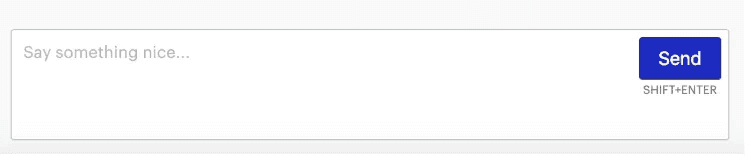
Here, some might say that only the “SHIFT+ENTER” is microcopy, as it’s a little bit of text supporting the send button.
For the purposes of this course, we’ll take a broader definition of microcopy that includes most of the copy inside an app or website. With this broad definition, we see that microcopy is the very framework upon which the rest of our apps and websites are built.
But words alone are not enough. The most powerful way to deliver a message is through visual communication. That’s why writing and design go together hand in hand. Let’s have a look at a few historical examples to show just how closely these two elements are linked:

Think small was a 1959 ad campaign by Volkswagen and has been called the best advertising campaign of the twentieth century.
Two words, one simple image, and they managed to build one of the most successful ad campaigns in history that boosted sales and built a lifetime of brand loyalty. The way the text and image support each other needs no explanation. 10/10 for copy and design.

They have managed to communicate that you can change your entire life in an instant just by scratching a ticket.
But not all microcopy is for advertising. When it comes to apps and websites, the best microcopy should make the user feel as if they are communicating with a real person rather than just a digital interface. The role of the UX writer is to bring this goal to fruition, which has the power to make or break a product.
In short, make sure your writing is brilliant! No, not full of light brilliant. Brilliant as in superb or wonderful. OK, I think you get the point.
To illustrate how good design and copy can positively affect user experience, let’s take a look at a few examples of high-quality work.
Medium’s newsletter aims to surprise you with a story:

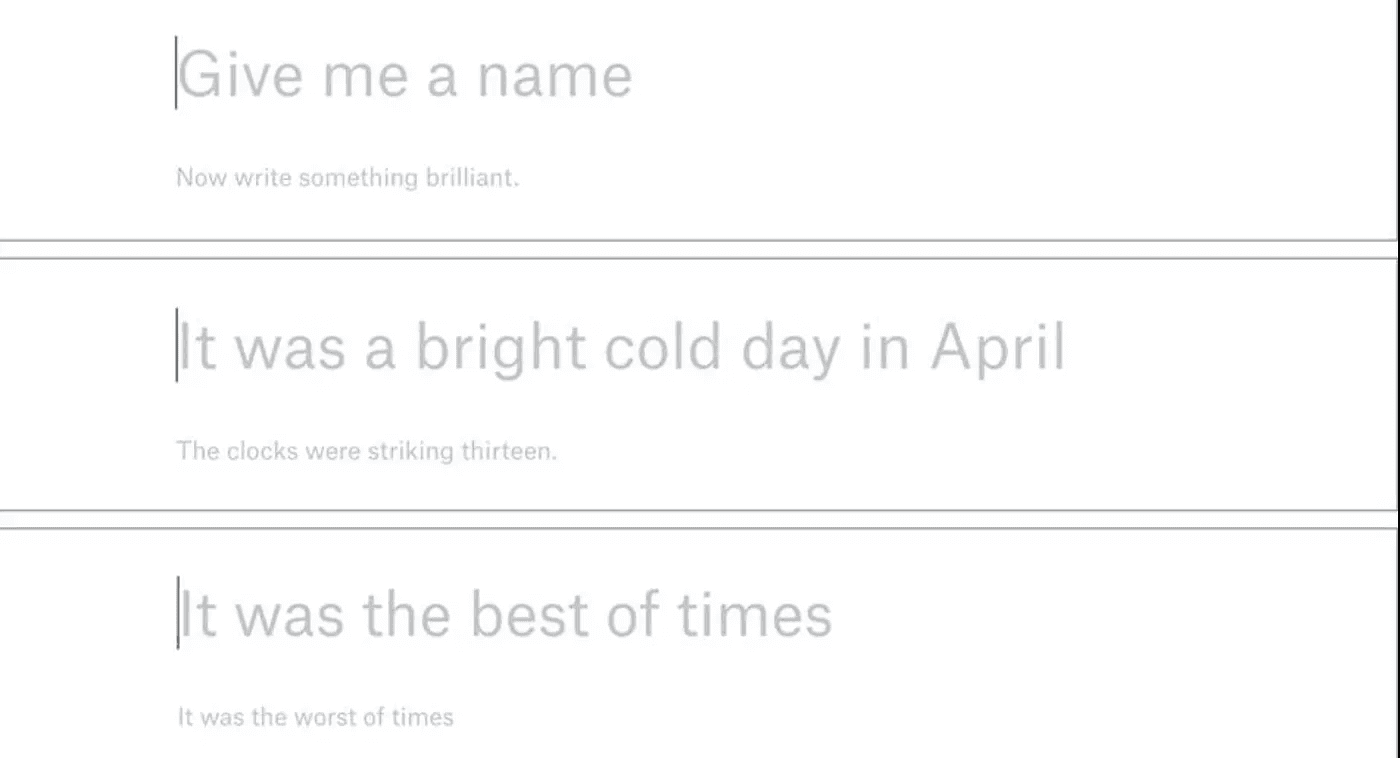
Dropbox Paper’s empty state placeholders:
The writers of Zocdoc are doing an excellent job of making their website intuitive so that users can easily order a doctor online when they’re not feeling their best.

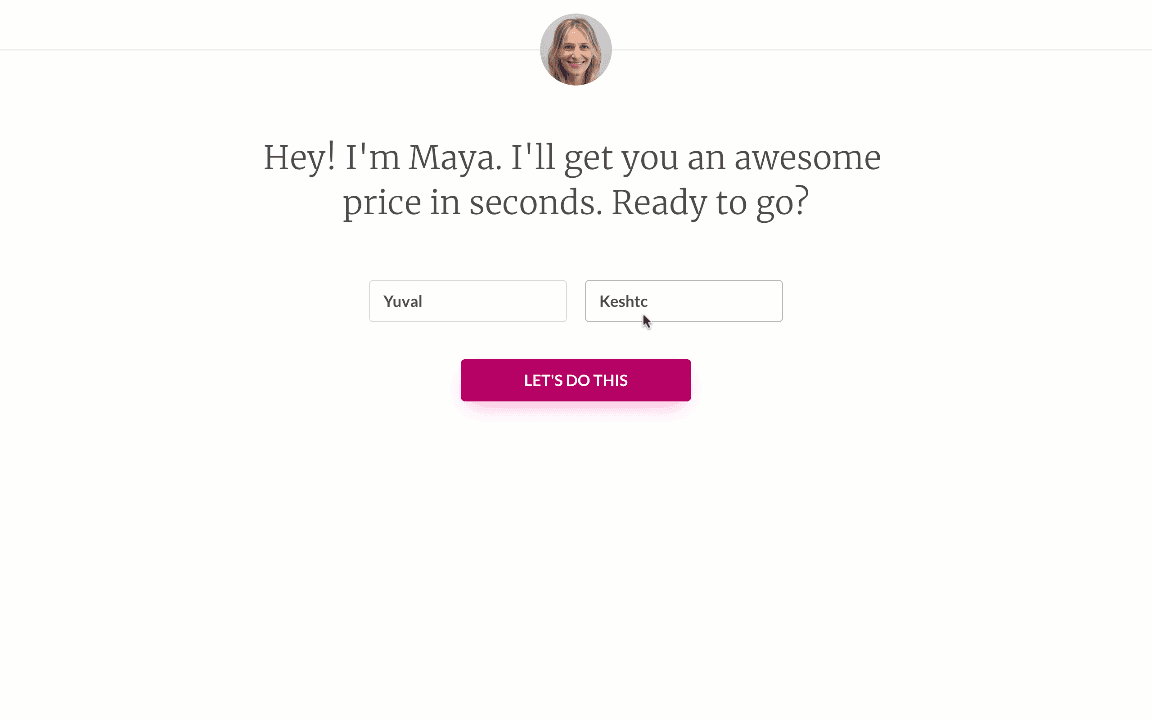
At Lemonade, they make sure users have a better experience getting instant insurance. Instead of the tired old process, Lemonade gives the user a digital web product that makes it straightforward and easy.
Harry’s is a subscription service for shaving accessories. If you find yourself on their 404 page, you’ve probably “missed a spot” and they want to help you to fix that.

Spotify uses witty microcopy when you un-like a song in your Daily Mix playlist.

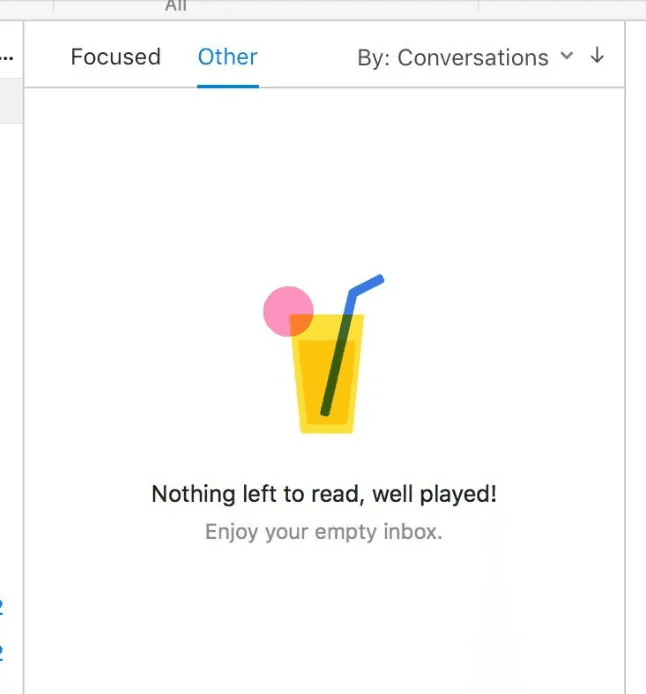
Empty state message by Outlook:
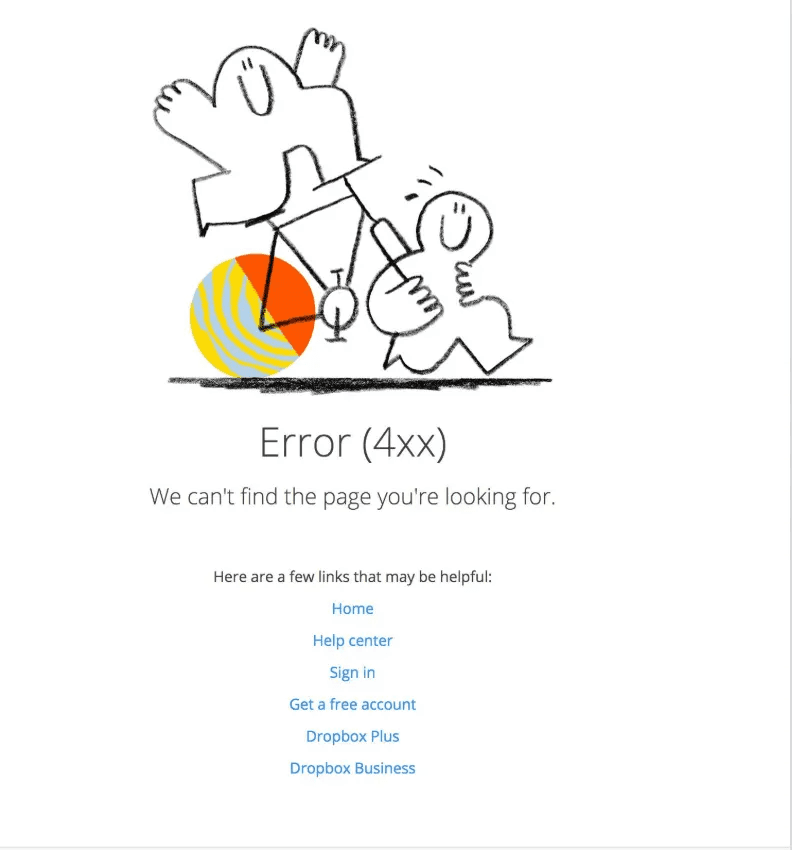
Dropbox copy helps users easily navigate through an error page, with cute illustrations too!
Netflix’s payment setup is written in clear, helpful language.

The list of great digital products goes on and on. Notice how the UX writing in these examples directly impacts the quality of the user experience — whether that experience is good or bad.


Summery
What did it tell us?
Microcopy is the term for the small bits of copy in a UI that help users do things, including error messages, labels in contact form, e-commerce hints, etc. These tiny words have a huge impact on conversion.
To find where your product could benefit from some changes/additions to your current copy, look for the microcopy that isn’t currently working well. If many users are asking for pricing information, chances are your “Request a quote” microcopy needs to be improved. Changing to “Request pricing” gets more conversions after testing.
Use microcopy to address user concerns including things like confirming they won’t get SPAM or fear of data loss. Can also inform users about why the app is asking for certain information.
Microcopy includes helpful error messages that instruct the user as to how to correct the error.
Good microcopy should be short, helpful, and should come at just the right moment.
So next time you’re using a product and everything just flows, take a moment to notice the tiny text making that happen.
And if you’re building a product?
Give your microcopy the attention it deserves.
Latest Updates
(AR — 02)
©2024


Aug 12, 2025
Small Enough to Miss, Powerful Enough to Change Everything
It’s not the big headlines or flashy visuals that shape your experience — it’s the quiet words in the background.
UX writing
Microcopy
Strategy
Let’s break it down
If copy is the text that’s published in a newspaper or magazine — and micro means small — then we’re talking about small text. But in the world of UX, microcopy is much more than tiny words on a screen. It’s the difference between a confused user and a confident one. Between frustration and flow. Between bounce and buy.
So what is microcopy, really?
It’s the text you see (and often don’t even notice) that quietly guides you through a product. It’s on buttons, in forms, inside tooltips and error messages. It helps you sign up, check out, search, navigate, and understand what just happened after you clicked something.
In short: microcopy is the voice of the product.
Where Microcopy Lives
You’ve seen microcopy everywhere — even if you didn’t realize it.
That little line under a password field that says “Must contain at least one number and one special character”? Microcopy.
The “Oops, something went wrong. Try again later” message when the Wi-Fi drops? Microcopy.
The “Thanks for signing up! You’re all set 🎉”? Yup. Microcopy again.
It shows up in:
Buttons
Forms (and every field in them)
Empty states
Error states
Confirmation messages
Tooltips
Navigation bars
Onboarding flows
Search bars
Even those tiny helper texts below input fields
But Why Is It That Important?
Because when users interact with a product, every tap, swipe, or click is part of a conversation. And microcopy is how we keep that conversation going — clearly, smoothly, and (ideally) delightfully.
Most of it falls into a few key categories:
Onboarding: Helping a new user feel like they belong.
Action prompts: Getting someone to click that button, complete a step, or explore a feature.
Error handling: Explaining what went wrong and how to fix it (without sounding like a robot).
Feedback: Confirming that something worked — or didn’t — and what comes next.
In many cases, microcopy is the bridge between intention and action.
A Broader Take on Microcopy
Now, let’s acknowledge something: there isn’t one single, universal definition of microcopy.
Some folks keep it tight — short bits of text that support UI elements. Others, like Kinneret Yifrah (author of Microcopy: The Complete Guide), offer a slightly more expansive view:
“Microcopy is the words or phrases in the user interface that are directly related to the actions a user takes:
The motivation before the action, the instructions that accompany the action, and the feedback after the user has taken the action.”
That definition? That’s where I lean. Because in the grand scheme of UX, we can’t afford to think of microcopy as just button labels. It’s the connective tissue of the entire user experience. It’s often invisible until it’s bad — and then suddenly, it’s all the user sees.
How important it is?
Small Words, Big Impact
Think about the last time you used a new app. What made it feel easy? Or annoying?
Chances are, microcopy played a huge role.
Good microcopy feels natural. Human. Helpful. It knows when to explain and when to get out of the way. It respects your time. It anticipates your confusion before you even realize you’re confused.
Bad microcopy? That’s where we get sign-up forms that say “Invalid input” with zero context. Or confirmation messages that don’t confirm anything. It’s vague, cold, and usually leaves users guessing.
Writing Microcopy That Works
Here are a few principles I follow when writing microcopy:
Be clear, not clever.
Don’t trade clarity for wordplay. A witty error message is still an error.
Write for real people.
Use the language your users use. Read it out loud — does it sound human?
Guide, don’t guard.
Instead of warning users about what not to do, focus on what to do.
Be concise, not abrupt.
Short is good. Rude is not.
Context is everything.
Make sure the copy reflects where the user is in the journey — and what they might be feeling.
Some have an even narrower definition, limiting microcopy to the short texts that support other copy or elements on the page. For example:
Here, some might say that only the “SHIFT+ENTER” is microcopy, as it’s a little bit of text supporting the send button.
For the purposes of this course, we’ll take a broader definition of microcopy that includes most of the copy inside an app or website. With this broad definition, we see that microcopy is the very framework upon which the rest of our apps and websites are built.
But words alone are not enough. The most powerful way to deliver a message is through visual communication. That’s why writing and design go together hand in hand. Let’s have a look at a few historical examples to show just how closely these two elements are linked:
Think small was a 1959 ad campaign by Volkswagen and has been called the best advertising campaign of the twentieth century.
Two words, one simple image, and they managed to build one of the most successful ad campaigns in history that boosted sales and built a lifetime of brand loyalty. The way the text and image support each other needs no explanation. 10/10 for copy and design.
They have managed to communicate that you can change your entire life in an instant just by scratching a ticket.
But not all microcopy is for advertising. When it comes to apps and websites, the best microcopy should make the user feel as if they are communicating with a real person rather than just a digital interface. The role of the UX writer is to bring this goal to fruition, which has the power to make or break a product.
In short, make sure your writing is brilliant! No, not full of light brilliant. Brilliant as in superb or wonderful. OK, I think you get the point.
To illustrate how good design and copy can positively affect user experience, let’s take a look at a few examples of high-quality work.
Medium’s newsletter aims to surprise you with a story:
Dropbox Paper’s empty state placeholders:
The writers of Zocdoc are doing an excellent job of making their website intuitive so that users can easily order a doctor online when they’re not feeling their best.
At Lemonade, they make sure users have a better experience getting instant insurance. Instead of the tired old process, Lemonade gives the user a digital web product that makes it straightforward and easy.
Harry’s is a subscription service for shaving accessories. If you find yourself on their 404 page, you’ve probably “missed a spot” and they want to help you to fix that.
Spotify uses witty microcopy when you un-like a song in your Daily Mix playlist.
Empty state message by Outlook:
Dropbox copy helps users easily navigate through an error page, with cute illustrations too!
Netflix’s payment setup is written in clear, helpful language.
The list of great digital products goes on and on. Notice how the UX writing in these examples directly impacts the quality of the user experience — whether that experience is good or bad.
Summery
What did it tell us?
Microcopy is the term for the small bits of copy in a UI that help users do things, including error messages, labels in contact form, e-commerce hints, etc. These tiny words have a huge impact on conversion.
To find where your product could benefit from some changes/additions to your current copy, look for the microcopy that isn’t currently working well. If many users are asking for pricing information, chances are your “Request a quote” microcopy needs to be improved. Changing to “Request pricing” gets more conversions after testing.
Use microcopy to address user concerns including things like confirming they won’t get SPAM or fear of data loss. Can also inform users about why the app is asking for certain information.
Microcopy includes helpful error messages that instruct the user as to how to correct the error.
Good microcopy should be short, helpful, and should come at just the right moment.
So next time you’re using a product and everything just flows, take a moment to notice the tiny text making that happen.
And if you’re building a product?
Give your microcopy the attention it deserves.
Latest Updates
(AR — 02)
©2024
Aug 12, 2025
Small Enough to Miss, Powerful Enough to Change Everything
It’s not the big headlines or flashy visuals that shape your experience — it’s the quiet words in the background.
UX writing
Microcopy
Strategy
Let’s break it down
If copy is the text that’s published in a newspaper or magazine — and micro means small — then we’re talking about small text. But in the world of UX, microcopy is much more than tiny words on a screen. It’s the difference between a confused user and a confident one. Between frustration and flow. Between bounce and buy.
So what is microcopy, really?
It’s the text you see (and often don’t even notice) that quietly guides you through a product. It’s on buttons, in forms, inside tooltips and error messages. It helps you sign up, check out, search, navigate, and understand what just happened after you clicked something.
In short: microcopy is the voice of the product.
Where Microcopy Lives
You’ve seen microcopy everywhere — even if you didn’t realize it.
That little line under a password field that says “Must contain at least one number and one special character”? Microcopy.
The “Oops, something went wrong. Try again later” message when the Wi-Fi drops? Microcopy.
The “Thanks for signing up! You’re all set 🎉”? Yup. Microcopy again.
It shows up in:
Buttons
Forms (and every field in them)
Empty states
Error states
Confirmation messages
Tooltips
Navigation bars
Onboarding flows
Search bars
Even those tiny helper texts below input fields
But Why Is It That Important?
Because when users interact with a product, every tap, swipe, or click is part of a conversation. And microcopy is how we keep that conversation going — clearly, smoothly, and (ideally) delightfully.
Most of it falls into a few key categories:
Onboarding: Helping a new user feel like they belong.
Action prompts: Getting someone to click that button, complete a step, or explore a feature.
Error handling: Explaining what went wrong and how to fix it (without sounding like a robot).
Feedback: Confirming that something worked — or didn’t — and what comes next.
In many cases, microcopy is the bridge between intention and action.
A Broader Take on Microcopy
Now, let’s acknowledge something: there isn’t one single, universal definition of microcopy.
Some folks keep it tight — short bits of text that support UI elements. Others, like Kinneret Yifrah (author of Microcopy: The Complete Guide), offer a slightly more expansive view:
“Microcopy is the words or phrases in the user interface that are directly related to the actions a user takes:
The motivation before the action, the instructions that accompany the action, and the feedback after the user has taken the action.”
That definition? That’s where I lean. Because in the grand scheme of UX, we can’t afford to think of microcopy as just button labels. It’s the connective tissue of the entire user experience. It’s often invisible until it’s bad — and then suddenly, it’s all the user sees.
How important it is?
Small Words, Big Impact
Think about the last time you used a new app. What made it feel easy? Or annoying?
Chances are, microcopy played a huge role.
Good microcopy feels natural. Human. Helpful. It knows when to explain and when to get out of the way. It respects your time. It anticipates your confusion before you even realize you’re confused.
Bad microcopy? That’s where we get sign-up forms that say “Invalid input” with zero context. Or confirmation messages that don’t confirm anything. It’s vague, cold, and usually leaves users guessing.
Writing Microcopy That Works
Here are a few principles I follow when writing microcopy:
Be clear, not clever.
Don’t trade clarity for wordplay. A witty error message is still an error.
Write for real people.
Use the language your users use. Read it out loud — does it sound human?
Guide, don’t guard.
Instead of warning users about what not to do, focus on what to do.
Be concise, not abrupt.
Short is good. Rude is not.
Context is everything.
Make sure the copy reflects where the user is in the journey — and what they might be feeling.
Some have an even narrower definition, limiting microcopy to the short texts that support other copy or elements on the page. For example:
Here, some might say that only the “SHIFT+ENTER” is microcopy, as it’s a little bit of text supporting the send button.
For the purposes of this course, we’ll take a broader definition of microcopy that includes most of the copy inside an app or website. With this broad definition, we see that microcopy is the very framework upon which the rest of our apps and websites are built.
But words alone are not enough. The most powerful way to deliver a message is through visual communication. That’s why writing and design go together hand in hand. Let’s have a look at a few historical examples to show just how closely these two elements are linked:
Think small was a 1959 ad campaign by Volkswagen and has been called the best advertising campaign of the twentieth century.
Two words, one simple image, and they managed to build one of the most successful ad campaigns in history that boosted sales and built a lifetime of brand loyalty. The way the text and image support each other needs no explanation. 10/10 for copy and design.
They have managed to communicate that you can change your entire life in an instant just by scratching a ticket.
But not all microcopy is for advertising. When it comes to apps and websites, the best microcopy should make the user feel as if they are communicating with a real person rather than just a digital interface. The role of the UX writer is to bring this goal to fruition, which has the power to make or break a product.
In short, make sure your writing is brilliant! No, not full of light brilliant. Brilliant as in superb or wonderful. OK, I think you get the point.
To illustrate how good design and copy can positively affect user experience, let’s take a look at a few examples of high-quality work.
Medium’s newsletter aims to surprise you with a story:
Dropbox Paper’s empty state placeholders:
The writers of Zocdoc are doing an excellent job of making their website intuitive so that users can easily order a doctor online when they’re not feeling their best.
At Lemonade, they make sure users have a better experience getting instant insurance. Instead of the tired old process, Lemonade gives the user a digital web product that makes it straightforward and easy.
Harry’s is a subscription service for shaving accessories. If you find yourself on their 404 page, you’ve probably “missed a spot” and they want to help you to fix that.
Spotify uses witty microcopy when you un-like a song in your Daily Mix playlist.
Empty state message by Outlook:
Dropbox copy helps users easily navigate through an error page, with cute illustrations too!
Netflix’s payment setup is written in clear, helpful language.
The list of great digital products goes on and on. Notice how the UX writing in these examples directly impacts the quality of the user experience — whether that experience is good or bad.
Summery
What did it tell us?
Microcopy is the term for the small bits of copy in a UI that help users do things, including error messages, labels in contact form, e-commerce hints, etc. These tiny words have a huge impact on conversion.
To find where your product could benefit from some changes/additions to your current copy, look for the microcopy that isn’t currently working well. If many users are asking for pricing information, chances are your “Request a quote” microcopy needs to be improved. Changing to “Request pricing” gets more conversions after testing.
Use microcopy to address user concerns including things like confirming they won’t get SPAM or fear of data loss. Can also inform users about why the app is asking for certain information.
Microcopy includes helpful error messages that instruct the user as to how to correct the error.
Good microcopy should be short, helpful, and should come at just the right moment.
So next time you’re using a product and everything just flows, take a moment to notice the tiny text making that happen.
And if you’re building a product?
Give your microcopy the attention it deserves.